Ask Benny Partner API
Base URL: https://api.askbennypartners.com/v1
Programmatic access to your partner workspace: manage clients, start their platform access, and keep your systems in sync.
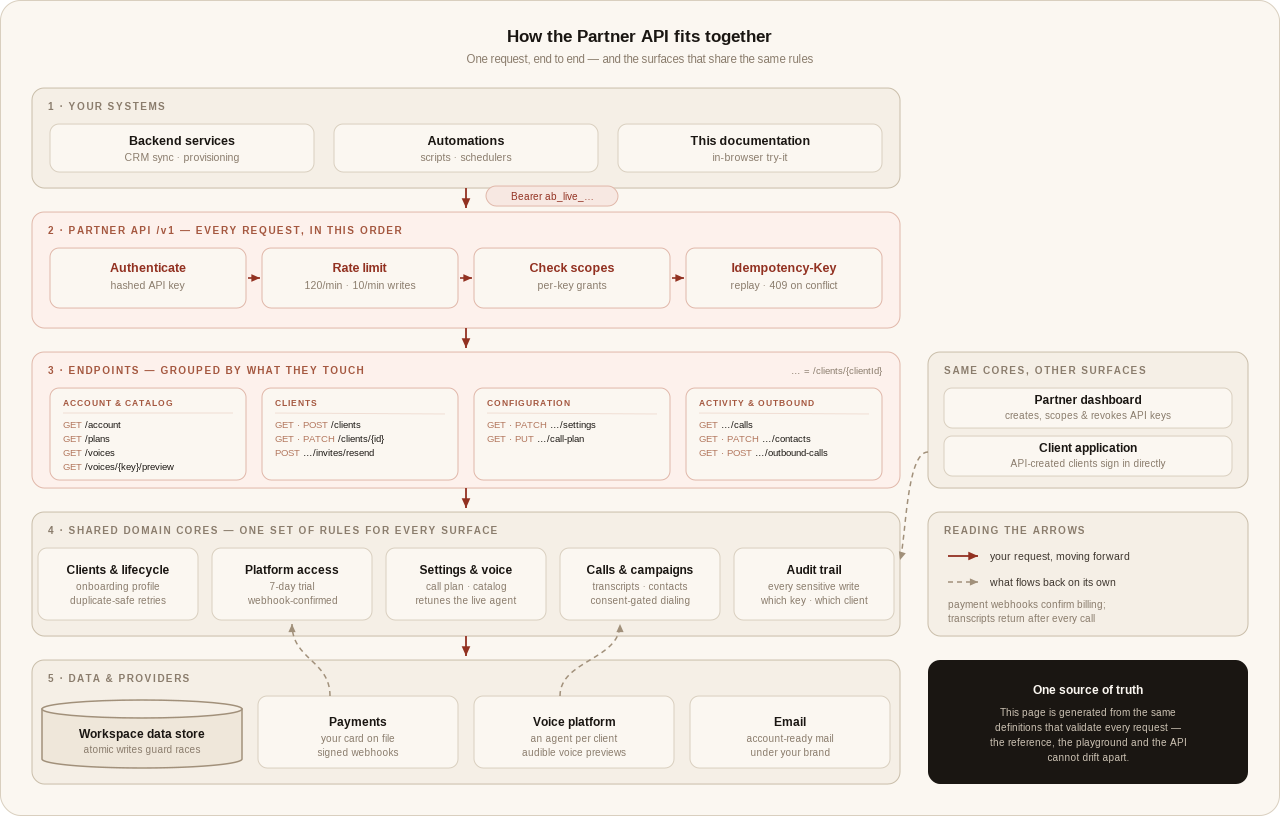
How it fits together
Quickstart
- Create an API key from Dashboard -> Business -> API Keys (an active platform subscription is required). The full key is shown once - store it in your secret manager.
- Send it on every request:
curl https://api.askbennypartners.com/v1/account \
-H "Authorization: Bearer <your api key>"- List your clients:
curl "https://api.askbennypartners.com/v1/clients?limit=25" \
  -H "Authorization: Bearer <your api key>"
Authentication
Every request carries Authorization: Bearer <api key>. Keys are scoped - a request needs the scope listed on its operation (a missing scope returns 403 MISSING_SCOPE with the required scope in details). Revoking a key from the dashboard takes effect immediately. Keys only authenticate while your account is active.
Use a dedicated low-scope key when experimenting here: requests from this page run against live data.
Errors
Every error uses one envelope:
{ "error": "Client not found", "code": "NOT_FOUND", "statusCode": 404, "traceId": "..." }code is stable and machine-readable: VALIDATION_ERROR (400 - every issue listed in details.issues), UNAUTHORIZED (401), FORBIDDEN / MISSING_SCOPE / SETUP_INCOMPLETE (403), NOT_FOUND (404), CONFLICT / IDEMPOTENCY_CONFLICT (409), CARD_ON_FILE_REQUIRED / PAYMENT_FAILED (402), TOO_MANY_REQUESTS (429), INTERNAL_ERROR (500). Include traceId when contacting support.
Pagination
List endpoints return { "data": [...], "nextCursor": "..." | null }. Pass limit (bounded per endpoint) and follow nextCursor - an opaque token with no format guarantee - until it is null. Filtered pages can hold fewer than limit items while more pages remain.
Partial updates
PATCH merges. Send only the fields you are changing, and everything you omit keeps its current value - a client settings save can be as small as {"agent": {"selectedVoiceKey": "ava"}}. Sections and fields you leave out are never read, so there is no need to fetch the object first and echo it back. Each write operation on this page shows a minimal request example; copy that shape rather than a full object read from a GET, or you will write placeholder values over settings that are already correct.
PUT replaces. The only one is PUT /clients/{clientId}/call-plan: the plan you send becomes the whole plan, and any node or edge you leave out is removed.
Lists are the exception to merging. An array you send replaces the stored list wholesale, so business.coreServices, agent.supportedLanguages, dataCollection.fields, and hours.weeklyHours must each carry the complete list you want to end up with - send every entry, not just the new ones, or omit the array to leave the stored list alone. Two of them also have required parts: dataCollection.fields is required whenever you send the dataCollection section, and every hours.weeklyHours row needs all four of day, open, close, and isOpen.
Idempotency
Operations with billing or calling side effects require an Idempotency-Key header (any unique string, up to 255 chars). Retrying with the same key and identical request replays the original response (marked Idempotency-Replayed: true); the same key with a different request returns 409 IDEMPOTENCY_CONFLICT; keys are remembered for 24 hours. If a request fails, retry with the same key - failed attempts are released so the retry executes. The exception is campaign create/retry: once dispatch to the calling network may have started, a failed attempt consumes the key (the same key replays the stored error) - check the campaign list, then use a fresh key, so a retry can never dial your recipients twice.
Rate limits
120 requests/minute per key across the API; sensitive operations (like client creation) allow 10/minute. Responses carry X-RateLimit-Limit, X-RateLimit-Remaining, and X-RateLimit-Reset; a 429 includes Retry-After in seconds.
Getting a client ready
One call does most of it. POST /clients creates the client, starts its platform access on your card on file with a 7-day free trial (your card is first charged when the trial ends), and - when you include the onboarding block - builds their voice agent from the business profile you supply.
curl -X POST https://api.askbennypartners.com/v1/clients \
  -H "Authorization: Bearer <your api key>" \
  -H "Content-Type: application/json" \
  -H "Idempotency-Key: $(uuidgen)" \
  -d '{
        "name": "Acme Plumbing",
        "contactEmail": "owner@acmeplumbing.com",
        "onboarding": {
          "businessName": "Acme Plumbing",
          "businessPhone": "+14035550142",
          "websiteUrl": "https://acmeplumbing.com"
        }
      }'
What happens, in order:
- The client is created as a
draftand your seat subscription starts its trial. - Their voice agent is built from the
onboardingprofile -businessNameandbusinessPhoneare required, plus eitherwebsiteUrlorbusinessAddress. The website also seeds what the assistant knows about the business. - Once the seat is confirmed, the client moves to
invitedand the owner is emailed. With anonboardingblock that email is a branded "your account is ready" sign-in link rather than a setup invite - there are no onboarding steps left for them to complete. - The owner gets portal access. Either they sign in from that email, or you skip the wait with
POST /clients/{clientId}/activate- see below.
Omit onboarding and the client instead receives a setup invite and completes the profile themselves; their agent is built at the end of that.
Correcting the business website
The create payload remains onboarding.websiteUrl. It seeds the internal training website and is returned as business.websiteUrl by GET /clients/{clientId}/settings. Updating another settings section preserves this source.
After provisioning, use a key with client_settings:write and send only the website correction:
PATCH /v1/clients/{clientId}/settings
Content-Type: application/json
Authorization: Bearer <your api key>

{ "training": { "websiteUrl": "https://acmeplumbing.com" } }
The URL must be a non-empty HTTP or HTTPS URL, at most 2,000 characters. Omit it to leave the source unchanged; null and empty strings are rejected. The client's platform billing must be active or trialing. The update saves the source and queues a knowledge refresh; inspect agent.knowledgeRefresh for progress. A failed refresh keeps the saved source and reports its status. business.websiteUrl remains a read-only response field, so do not echo it into the business patch. Creating the client again is not an update mechanism.
Activating a client yourself
Until someone signs in, a client has no portal login - so the client is not active, and you cannot open a support session for them. If you are onboarding the client yourself and want their workspace usable straight away, activate it:
curl -X POST https://api.askbennypartners.com/v1/clients/<clientId>/activate \
  -H "Authorization: Bearer <your api key>"
That creates the owner's login from the contactEmail on the client, moves the client to active, and makes support impersonation possible. The owner can still sign in with their email whenever they like - nothing about their normal access changes.
Safe to repeat: a client whose owner already has access returns alreadyActive: true and nothing changes. Two things to know:
- Only clients created through this API can be activated. Clients created in the dashboard keep the ordinary email sign-in.
- The client needs a pending owner invite. If it has already been accepted or has expired, send a fresh one with
POST /clients/{clientId}/invites/resendand activate again.
Because this grants access without the owner confirming their email, it is recorded in your workspace audit trail against the API key that made the call.
Settings, hours and services can be changed any time afterwards with PATCH /clients/{clientId}/settings.
Call recordings and active-client access
Calls (including recordings), contacts, and outbound operations require the client to be active and its platform billing to be active or trialing. Otherwise the API returns 403 CLIENT_ACCESS_INACTIVE. Client creation, client/billing reads, onboarding settings, knowledge-base setup, invitations and activation remain available before activation under their existing billing and scope rules.
When a call has audioAvailable: true, request GET /clients/{clientId}/calls/{callId}/audio with a key that has calls:read. The response contains audioUrl and expiresInSeconds: 300. Use the URL as an audio player's source or fetch it to download the MP3; do not send your API key to that URL. Request a fresh URL after five minutes. The response must not be cached, and obtaining a URL does not mark the call viewed.
Anyone holding the recording URL can access it until it expires, including if the client is paused or the API key is revoked after issuance. Keep it private. A missing call or recording returns 404.
Steering the assistant: the business prompt
business.businessInstructions is free-text guidance the assistant follows on every call, on top of what it learned from the website or address. Use it for the things a new receptionist would need to be told and could not infer:
- House rules — *"we do not quote prices over the phone"*, *"always confirm the service address before booking"*.
- Tone — how formal to be, what to call the business.
- Edge cases — what to do about after-hours emergencies, which jobs to decline, when to take a message instead of booking.
curl -X PATCH https://api.askbennypartners.com/v1/clients/<clientId>/settings \
  -H "Authorization: Bearer <your api key>" \
  -H "Content-Type: application/json" \
  -d '{
        "business": {
          "businessInstructions": "Always confirm the service address before booking. Never quote prices - offer a callback from the owner instead."
        }
      }'
It is the same field the client edits as their business prompt in their own dashboard, so the two of you are writing to one place - a later edit from either side replaces it rather than merging. Read the current value from GET /clients/{clientId}/settings first if you are appending to it rather than replacing it.
At most 800 words and 16,000 characters. Send an empty string to clear it. Prefer plain, specific instructions over long prose - it is read on every call.
Retail plans and planId
A plan is a tier you sell to your own clients - name, price, trial length. Create and price them in Dashboard -> Business -> Plans; read them with GET /plans (scope clients:read) to discover the planId values this endpoint accepts. Only active plans can be attached.
planId is optional, and the choice decides who pays for the client:
planId | Who pays | The client's first sign-in |
|---|---|---|
| omitted | You - your seat covers their access | Straight to their dashboard |
| an ordinary plan | The client, through the platform | Lands on checkout for that plan |
| a plan marked billed externally | You invoice them yourself, off-platform | Straight to their dashboard |
Attaching an ordinary plan means the client is asked to pay before they can use anything. That is the right choice when you want the platform to collect for you and route the money to your connected account.
Plans you bill yourself
If you already invoice a client - an existing contract, a bundle, a retainer - you still want the record of which tier they are on, but you do not want the platform asking them for money. Tick "I bill clients for this plan myself" on the plan and it is returned by GET /plans as billedExternally: true.
Clients attached to such a plan skip checkout entirely and sign straight in to their dashboard, exactly as if no plan were attached - your seat still covers their access - while the plan records their tier. No subscription or invoice is ever created for them here, so they show as Billed externally in your dashboard rather than as a paying subscription.
Two things worth knowing:
- The setting lives on the plan, not the price. A $0 plan is not automatically treated this way, and repricing a plan never changes who collects for the clients already on it.
- The option only appears in the dashboard once you have an active API key, because it only changes behaviour for clients created through this API. Clients you create in the dashboard follow the ordinary retail flow whatever the plan says.
If billing cannot start
You get 402 with details.clientId. The client exists; only the billing step failed. Fix the payment method in the dashboard, then repeat the call with the same contactEmail and a new Idempotency-Key - the billing step resumes on that existing draft instead of failing as a duplicate.
Voices
GET /voices lists the full voice catalog - the same voices, in the same order, your clients see in their own application. Each entry carries a stable key, a display name, gender, the accent it speaks with (American, British, Indian, Australian, Nigerian and more), short tone descriptors, a one-line description, and a previewUrl.
Listen before you choose: GET /voices/{voiceKey}/preview returns a short MP3 of that voice speaking the assistant's standard greeting. Samples are deterministic, so cache them freely.
A voice's languages (and primaryLanguage) are the languages it sounds native in, using the same codes as agent.supportedLanguages - regional variants collapse to their base code, so a British voice reports en and carries "British" in accent. They are catalog facts, not a limit: what the assistant actually speaks is set by agent.supportedLanguages.
Apply a voice with PATCH /clients/{clientId}/settings and {"agent": {"selectedVoiceKey": "<key>"}} - any key from GET /voices. The client's assistant must already be set up. GET /clients/{clientId}/settings reports the current voice back as agent.selectedVoiceKey.
Two older keys, ava and miles, are still accepted; they are aliases of the ava and jason voices.
Bring your own API
Connect a customer's existing system to their voice assistant with /clients/{clientId}/api-endpoints. This is the same configuration available in Settings → API Endpoints. Add a public HTTPS endpoint, HTTP method, when-to-use description, request fields, and a bearer token or API-key header. Credentials are encrypted and write-only; the assistant calls through an authenticated proxy.
The sequence is create → verify → enable. POST /clients/{clientId}/api-endpoints saves a disabled endpoint. POST /clients/{clientId}/api-endpoints/{endpointId}/verify sends one real request using sampleValues; use a customer sandbox or their supported no-write test mode, because verification can change records. No universal verification flag is added. Then PATCH /clients/{clientId}/api-endpoints/{endpointId} with {"enabled":true} attaches the tool to the voice assistant. Configuration edits require verification again. Disabling revokes access before detaching the tool.
Verification returns ok, the redacted endpoint, a safe diagnostic message, and the customer HTTP status (null if no response arrived). HTTP 401/403 points to credentials or permissions; 404 to the path/method; 429 to rate limiting. A 2xx response can still fail the configured response schema. No customer response body is exposed by verification. Reads use client_settings:read; writes use client_settings:write. POST creation and verification require Idempotency-Key. There are at most ten endpoints per client. GET request fields become query parameters; other methods send JSON. requestTemplate can map fields using {{field_name}} placeholders; leave it as {} to send the fields directly. Optional responseSchema supports structural type/properties/required/items validation. Requests have a 1–8 second timeout, a 1 MB response cap and a shared 30 requests/minute endpoint limit. Customer requests are never automatically retried.
Request template walkthrough
requestTemplate and responseSchema are JSON-encoded strings, not JSON objects in the create/update request. The reference displays them as string fields, so there are no nested properties to expand. The examples below show the decoded JSON and the complete payload to send. In JavaScript, use JSON.stringify(object) for each field; in raw JSON, escape the inner quotes as shown in the complete creation example.
Start simple: omit requestTemplate or send the string "{}" to forward the declared, collected fields directly. For example, sampleValues: {"caller_name":"Alex"} produces {"caller_name":"Alex"}. The template is not a list of fields for the agent to collect: declare those separately in parameters.
To match a customer API's nested payload, use this decoded template:
{
  "customer": {
    "name": "{{caller_name}}"
  },
  "request": {
    "units": "{{units}}",
    "urgent": "{{urgent}}",
    "notes": "{{notes}}"
  },
  "source": "voice_assistant"
}
Every placeholder must name a declared parameter. A whole-value placeholder such as "{{units}}" preserves the supplied number or boolean; embedding it in text such as "Units: {{units}}" produces a string. Fixed values such as source are sent unchanged. If an optional value is missing, a whole-value placeholder removes that property (or array item); an embedded placeholder becomes empty text. Missing required values fail before a customer request is sent. Keep credentials in auth, never in templates.
With sampleValues below (notice that numbers and booleans are not quoted):
{
  "caller_name": "Alex",
  "units": 2,
  "urgent": false
}
The customer's POST endpoint receives:
{
  "customer": {
    "name": "Alex"
  },
  "request": {
    "units": 2,
    "urgent": false
  },
  "source": "voice_assistant"
}
GET endpoints send the rendered fields as query parameters; use flat scalar fields for predictable query encoding. POST, PUT, PATCH and DELETE send a JSON body. Templates must decode to a JSON object and fit within 20 KB.
Response schema walkthrough
responseSchema checks the customer API's JSON response during verification and live tool calls. It does not transform the response, configure request fields, or tell the assistant when to call the tool. Put tool-use instructions in description. Omit this field or send "" to disable response-shape validation. Even without a schema, the customer must return a successful HTTP status for verification to pass.
This decoded schema requires two string properties:
{
  "type": "object",
  "properties": {
    "request_id": {
      "type": "string"
    },
    "status": {
      "type": "string"
    }
  },
  "required": [
    "request_id",
    "status"
  ]
}
Matching customer response:
{
  "request_id": "REQ-123",
  "status": "received"
}
A missing request_id or a numeric request_id fails validation, even with HTTP 200. Extra properties are allowed. The word received is illustrative: this schema checks that status is a string, not a particular business outcome.
Supported validation keywords: type, properties, required, and items. Supported types: object, array, string, number, integer, boolean, and null. Use items to validate array elements. title and description are accepted annotations. This is a structural subset, not full JSON Schema: constraints such as enum, format, additionalProperties, $ref, oneOf, and numeric bounds are rejected. Schemas are limited to 20 KB and eight nested levels below the root. Verification reports success/failure and safe diagnostics, not the customer response body.
Complete creation example
Send this body to POST /clients/{clientId}/api-endpoints with your Partner bearer token, Content-Type: application/json, and a new Idempotency-Key. Replace the example URL and customer token with your sandbox details. The Partner bearer token authenticates to our API; auth.secret authenticates to the customer's API. In the create operation's example selector, choose Send fields directly (simplest) or Map a nested request and validate its response to load a complete body.
{
  "name": "create_service_request",
  "description": "Create a service request after confirming the caller's name, number of units, and urgency. Collect notes if offered. Only confirm receipt when the API returns a request_id; do not promise a booking.",
  "method": "POST",
  "url": "https://api.example.com/service-requests",
  "auth": {
    "type": "bearer",
    "secret": "YOUR_CUSTOMER_API_TOKEN"
  },
  "parameters": [
    {
      "name": "caller_name",
      "type": "string",
      "description": "The caller's name",
      "required": true
    },
    {
      "name": "units",
      "type": "number",
      "description": "Number of units requiring service",
      "required": true
    },
    {
      "name": "urgent",
      "type": "boolean",
      "description": "Whether the caller says the request is urgent",
      "required": true
    },
    {
      "name": "notes",
      "type": "string",
      "description": "Optional additional details from the caller",
      "required": false
    }
  ],
  "requestTemplate": "{\"customer\":{\"name\":\"{{caller_name}}\"},\"request\":{\"units\":\"{{units}}\",\"urgent\":\"{{urgent}}\",\"notes\":\"{{notes}}\"},\"source\":\"voice_assistant\"}",
  "responseSchema": "{\"type\":\"object\",\"properties\":{\"request_id\":{\"type\":\"string\"},\"status\":{\"type\":\"string\"}},\"required\":[\"request_id\",\"status\"]}"
}
The response contains the new endpoint id, with enabled:false. Next, send the following body to POST /clients/{clientId}/api-endpoints/{endpointId}/verify with a different Idempotency-Key. Verification sends one real request and can create a record; use a sandbox or a request the customer explicitly supports for safe testing.
{
  "sampleValues": {
    "caller_name": "Alex",
    "units": 2,
    "urgent": false
  }
}
Only after verification returns ok:true, enable it using PATCH /clients/{clientId}/api-endpoints/{endpointId} with {"enabled":true}. To edit later, send only changed fields. requestTemplate: "{}" restores direct field forwarding; responseSchema: "" removes validation. An omitted PATCH field stays unchanged. Configuration edits disable the endpoint and require verification again before enabling.
Knowledge-base documents
Use client_settings:read for document reads and client_settings:write for uploads, usage changes, replacement and deletion. The client must have active platform access and a ready assistant before uploading. Supported files: PDF, TXT, DOCX, HTML and EPUB, up to 20 MiB.
POST /clients/{clientId}/knowledge-base/uploadswithfileNameand the exactfileSizeBytes. Send a uniqueIdempotency-Key.- POST multipart form data to the returned
url, copying every entry infieldsunchanged and adding the file last. Do not send your API bearer token to this temporary URL. - Within five minutes,
POST /clients/{clientId}/knowledge-base/documentswithuploadIdand optionalusageMode(autoby default), using a newIdempotency-Key. The returned document is attached to the assistant.
GET /clients/{clientId}/knowledge-base/documents lists documents (25 per page by default; follow nextCursor). Append /{documentId} to read a document, or /{documentId}/download for a temporary original-file download URL. Generated or older documents may not have an original file available.
PATCH /clients/{clientId}/knowledge-base/documents/{documentId} with {"usageMode":"prompt"} includes the document in the assistant prompt; auto lets the assistant retrieve relevant passages when needed.
To replace file contents, prepare and upload a new file, then POST /clients/{clientId}/knowledge-base/documents/{documentId}/replace with its uploadId. Usage settings are inherited unless supplied. Replacement attaches the new document before removing the previous one and returns a new document ID. If removing the previous document fails, the 409 response provides both IDs for reconciliation. Generated website knowledge is read-only through this API.
DELETE /clients/{clientId}/knowledge-base/documents/{documentId} removes the document from the agent and deletes its stored original. Send an Idempotency-Key for replayable deletion.
Retry an uncertain upload or replacement with the same request and original Idempotency-Key. A submitted upload cannot be reused with a different key; list documents before starting another upload after an ambiguous failure. Keep temporary upload fields and download URLs private.
Account
The partner account your API key belongs to.
GET /account Get the authenticated account
Returns the partner account this API key belongs to.
Responses:
Plans
Your retail plans: the subscription tiers you sell to clients. List them to discover the planId values accepted by client creation.
GET /plans List retail plans
Your retail plans, oldest first (creation order, matching the dashboard). Returns every plan — at most three can be active at once, so the list is small and not paginated. Only plans with status active can be passed as planId when creating a client; archived plans stay listed so historical plan ids remain resolvable.
Responses:
Clients
The businesses in your workspace: create them, manage their lifecycle and contact details, and read their platform access billing state.
GET /clients List clients
Clients in your workspace, newest first. Page with limit and the opaque nextCursor.
Parameters:
limit(query, integer, optional): Page size (1–100). Minimum 1. Maximum 100.cursor(query, string, optional): Opaque cursor from a previous response's nextCursor. At most 300 characters.status(query, string, optional): Only return clients with this status. Filtering applies within each page, so filtered pages can hold fewer thanlimititems — keep following nextCursor. One of"draft","invited","onboarding","active","paused","churned".
Responses:
200One page of clients. Returns ClientList.401Missing, malformed, revoked, expired, or wrong-environment API key. Returns Error.403The key lacks a required scope, or the account is not active. Returns Error.
POST /clients Create a client
Creates a client and starts its platform access subscription on your card on file with a 7-day free trial (your card is first charged when the trial ends). Requires an Idempotency-Key header. If a previous attempt created the client but billing did not start, repeating the call with the same contactEmail resumes the billing step. By default no retail plan is attached: your seat subscription covers the client's platform access, and providing the optional onboarding block lets the client sign straight in to their dashboard with zero onboarding steps (they receive a branded account-ready email instead of a setup invite). Pass planId to attach one of your active retail plans instead (discover plan ids via GET /plans) — that client's first sign-in then lands on checkout for the plan, paid by the client.
Request body (application/json): ClientCreate
name(string, required): At least 1 characters. At most 120 characters. Example:"Acme Plumbing".contactEmail(string, required): Primary contact email; must be unique within your workspace. At least 3 characters. At most 320 characters.slug(string, optional): Optional workspace-unique slug (lowercase letters, digits, hyphens). At least 1 characters. At most 63 characters.planId(string, optional): Optional retail plan to attach (one of your active plans with a price). When set, the client's first sign-in lands on checkout for this plan, paid by the client. When omitted — the default — no retail plan is attached and the client's platform access is covered entirely by your seat subscription. At least 1 characters. At most 120 characters.onboarding(ClientOnboarding, optional)
Responses:
201Client created (or resumed) with its billing summary. Returns ClientDetail.401Missing, malformed, revoked, expired, or wrong-environment API key. Returns Error.402The client exists but billing could not start: CARD_ON_FILE_REQUIRED (add a card from the dashboard) or PAYMENT_FAILED. details.clientId identifies the created client; repeat the call with a new Idempotency-Key to retry billing. Returns Error.403The key lacks a required scope, or the account is not active. Returns Error.409Conflict: duplicate contact email or slug, an Idempotency-Key reuse, or a billing operation already in progress. Returns Error.
GET /clients/{clientId} Get one client
A single client with its platform access billing summary.
Parameters:
clientId(path, string, required): The client id. At least 1 characters.
Responses:
200The client. Returns ClientDetail.401Missing, malformed, revoked, expired, or wrong-environment API key. Returns Error.403The key lacks a required scope, or the account is not active. Returns Error.404No such resource in this workspace. Returns Error.
PATCH /clients/{clientId} Update a client
Partial update — send only the fields you want to change. Anything you omit keeps its current value. Supported fields: name, status, contactEmail, slug. Status can only be toggled between active and paused — other lifecycle states are managed by the platform's billing and onboarding flows.
Parameters:
clientId(path, string, required): At least 1 characters.
Request body (application/json): ClientUpdate
name(string, optional): At least 1 characters. At most 120 characters.status(string, optional): One of"draft","invited","onboarding","active","paused","churned".contactEmail(string, optional): At least 3 characters. At most 320 characters.slug(string, optional): At least 1 characters. At most 63 characters.
Responses:
200The updated client. Returns ClientDetail.401Missing, malformed, revoked, expired, or wrong-environment API key. Returns Error.403The key lacks a required scope, or the account is not active. Returns Error.404No such resource in this workspace. Returns Error.409The new slug or contactEmail is already in use in your workspace. Returns Error.
POST /clients/{clientId}/activate Activate a client
Gives the client's owner portal access without waiting for them to sign in: their login is created from the contact email on the client, and the client moves to active. Use it when you are onboarding a client yourself and want their workspace usable — and support-impersonable — immediately. Safe to repeat: a client whose owner already has access returns alreadyActive: true and nothing changes. Only clients created through this API can be activated, and the client needs a pending owner invite (send one with POST /clients/{clientId}/invites/resend if it has already been accepted or has expired).
Parameters:
clientId(path, string, required): At least 1 characters.
Responses:
200The client's owner has portal access. Returns ClientActivation.401Missing, malformed, revoked, expired, or wrong-environment API key. Returns Error.403The key lacks a required scope, or the account is not active. Returns Error.404No such resource in this workspace. Returns Error.409The client has no pending owner invite to activate; resend the invite first. Returns Error.
POST /clients/{clientId}/invites/resend Resend the owner invite
Revokes any pending invite and emails a fresh owner invite. Requires the client's platform access to be active or trialing.
Parameters:
clientId(path, string, required): At least 1 characters.
Responses:
200The new invite. Returns ClientInvite.401Missing, malformed, revoked, expired, or wrong-environment API key. Returns Error.403The key lacks a required scope, or the account is not active. Returns Error.404No such resource in this workspace. Returns Error.
Voices
GET /voices List assistant voices
Every voice the phone assistant can speak with, with context on how each sounds — the same catalog, in the same order, that your clients see in their own application. Use a voice's key as agent.selectedVoiceKey when updating a client's settings, and its previewUrl to hear a sample. A voice's languages are the languages it sounds native in; the languages the assistant actually speaks are set by agent.supportedLanguages.
Responses:
200The voice catalog. Returns object.401Missing, malformed, revoked, expired, or wrong-environment API key. Returns Error.403The key lacks a required scope, or the account is not active. Returns Error.
GET /voices/{voiceKey}/preview Hear a voice sample
A short MP3 of the voice speaking the assistant's standard greeting — the same line callers hear. The sample is deterministic, so cache it freely.
Parameters:
voiceKey(path, string, required): A voicekeyfromGET /voices. The legacy keymilesis still accepted and previews thejasonvoice. A key for a voice that has since been withdrawn from the catalog is rejected with a 400. One of"mark","sam","chris","helen","samara","jessica","eve","juniper","hope","monika","arabella","blondie","alexandra","ivanna","marcela","santiago","brad","ben","agustin","adam","archer","abraham","mark-2","danielle","felix","alexadre","skel","nova","jarnathan","lucy","burt","jennifer","clarice","yohankoo","drew","ololade","gaby","carolina","eryn","gozde","bukola","hope-ii","callie","jenna","patrick","amelie","tremblay","leblong","anika","ivy","ava","christopher","michael","archer-2","tom","anne","johnathan","pete","jason","joseph","josh","pike","belle","jack","nathaniel","tiffany","tripti","emma","lauren","amy","karl","finn","kensington","raju","nova-ii","sekou","miles","adeline","brayden","andrew","lucas","heyez","yvonne","roberto". Example:"ava".
Responses:
Client Settings
GET /clients/{clientId}/settings Get client settings
Every portal Settings section except subscription billing: business profile, opening hours, notification preferences, assistant configuration (script, voice persona, voicemail), assigned assistant phone number, business website URL, provisioning and knowledge-refresh status, calendar booking policy, data collection fields, privacy, guardrails, and advanced tuning. Requires the client's platform access to be active or trialing.
Parameters:
clientId(path, string, required): The client id. At least 1 characters.
Responses:
200The client's settings. Returns ClientSettings.401Missing, malformed, revoked, expired, or wrong-environment API key. Returns Error.403The key lacks a required scope, the account is not active, or the client's platform access billing is not active or trialing, or a calls/contacts/outbound operation targets a Client whose status is not active (CLIENT_ACCESS_INACTIVE). Returns Error.404No such resource in this workspace. Returns Error.
PATCH /clients/{clientId}/settings Update client settings
Partial update — send only the fields you want to change. Anything you omit keeps its current value. Send one section with one field in it if that is all you are changing; sections you leave out are never read. Two things inside the body are complete lists rather than merges: dataCollection.fields replaces the whole field list and is required whenever you send the dataCollection section, and every hours.weeklyHours row needs all four of day, open, close, and isOpen. privacy.applyToExistingConversations additionally applies the retention rules to existing conversations on that save only. agent.selectedVoiceKey switches the assistant's voice persona and requires the client's assistant to be fully set up; when it is sent alongside other changes, the voice change is applied first, and the two steps are sequential rather than one transaction — if the second step fails, the applied change is kept (and audited), and repeating the request with the same Idempotency-Key safely retries both steps. After assistant provisioning has started, training.websiteUrl replaces the website knowledge source and queues a refresh; read the saved URL from business.websiteUrl and progress from agent.knowledgeRefresh. An Idempotency-Key header is honored when provided.
Parameters:
clientId(path, string, required): The client id. At least 1 characters.
Request body (application/json): ClientSettingsUpdate
training(object, optional)websiteUrl(string, optional): Replace the business website knowledge source with a non-empty HTTP or HTTPS URL. Omit it to keep the current source. Requires active or trialing platform access and assistant provisioning to have started. A change queues a knowledge refresh; inspect agent.knowledgeRefresh for its status. The resolved URL is returned as business.websiteUrl. At most 2000 characters. Pattern^[hH][tT][tT][pP][sS]?:\/\/. Example:"https://acmeplumbing.com".
business(object, optional)businessName(string, optional): At least 1 characters. At most 200 characters.businessPhone(string, optional): At most 40 characters.businessAddress(string, optional): At most 500 characters.businessInstructions(string, optional): Free-text guidance the assistant follows on every call. At most 800 words and 16000 characters. Send an empty string to clear it. At most 16000 characters.appointmentLinkEnabled(boolean, optional)bookingUrl(string, optional): At most 2000 characters.callTransferEnabled(boolean, optional)transferPhoneNumber(string, optional): At most 40 characters.coreServices(array of string, optional): At most 50 items.
hours(object, optional)mode(string, optional): One of"always","custom".timezone(string, optional): At least 1 characters. At most 100 characters.weeklyHours(array of object, optional): The complete weekly schedule, replacing the stored one. Every row needs all four ofday,open,close, andisOpen— a row is a whole day, not a patch of one. OmitweeklyHoursto leave the stored schedule alone. At most 7 items.day(string, required): At least 1 characters. At most 20 characters. Example:"monday".open(string, required): 24-hour HH:MM opening time. Pattern^\d{2}:\d{2}$. Example:"09:00".close(string, required): 24-hour HH:MM closing time. Pattern^\d{2}:\d{2}$. Example:"17:00".isOpen(boolean, required)
notifications(object, optional)emailEnabled(boolean, optional)emailAddress(string, optional): At most 320 characters.smsEnabled(boolean, optional)smsPhone(string, optional): At most 40 characters.additionalEmails(array of string, optional): At most 30 items.additionalPhones(array of string, optional): At most 30 items.
agent(object, optional)agentName(string, optional): At least 1 characters. At most 80 characters.firstMessage(string, optional): At least 1 characters. At most 500 characters.language(string, optional): At least 2 characters. At most 20 characters.supportedLanguages(array of string, optional): At least 1 items. At most 84 items.requireCallerName(boolean, optional)requireCallerEmail(boolean, optional)rememberPastCalls(boolean, optional)takeMessages(boolean, optional)specificQuestions(array of string, optional): At most 30 items.selectedVoiceKey(string, optional): Switch the assistant's voice to anykeyfromGET /voices. The legacy keysavaandmilesremain accepted. A key for a voice that has since been withdrawn from the catalog is rejected with a 400 naming the voice. One of"mark","sam","chris","helen","samara","jessica","eve","juniper","hope","monika","arabella","blondie","alexandra","ivanna","marcela","santiago","brad","ben","agustin","adam","archer","abraham","mark-2","danielle","felix","alexadre","skel","nova","jarnathan","lucy","burt","jennifer","clarice","yohankoo","drew","ololade","gaby","carolina","eryn","gozde","bukola","hope-ii","callie","jenna","patrick","amelie","tremblay","leblong","anika","ivy","ava","christopher","michael","archer-2","tom","anne","johnathan","pete","jason","joseph","josh","pike","belle","jack","nathaniel","tiffany","tripti","emma","lauren","amy","karl","finn","kensington","raju","nova-ii","sekou","miles","adeline","brayden","andrew","lucas","heyez","yvonne","roberto". Example:"ava".voiceModel(string, optional): Switch how the assistant's voice sounds on calls:standard,expressive, orstudio(see the read field). Requires the client's assistant to be fully set up, and is applied with the voice before the other sections. One of"standard","expressive","studio". Example:"expressive".voicemail(object, optional)enabled(boolean, optional)message(string, optional): At least 1 characters. At most 1000 characters.description(string, optional): At least 1 characters. At most 500 characters.
calendar(object, optional)bookingStartTime(string, optional): Pattern^\d{2}:\d{2}$.bookingEndTime(string, optional): Pattern^\d{2}:\d{2}$.defaultDuration(integer, optional): Minimum 5. Maximum 480.meetingType(string, optional): One of"online","in_person","both".bufferBetweenMeetings(integer, optional): Minimum 0. Maximum 60.allowSameDayBooking(boolean, optional)advanceBookingDays(integer, optional): Minimum 1. Maximum 365.includeLocation(boolean, optional)availabilityMode(string, optional): One of"agent_suggests","caller_requests".
dataCollection(object, optional): Structured fields the assistant extracts from every conversation.fieldsis required whenever you send thedataCollectionsection, because the list you send replaces the stored one wholesale — send every field you want to keep, or omit the section entirely to leave it untouched.fields(array of object, required): The complete list of fields to collect, replacing the stored one on save. At most 40 items.key(string, required): At most 64 characters. Pattern^[a-zA-Z][a-zA-Z0-9]*$.type(string, required): One of"string","boolean","integer","number".description(string, required): At least 1 characters. At most 500 characters.
privacy(object, optional)recordVoice(boolean, optional)retentionDays(integer, optional): Minimum -1. Maximum 3650.deleteTranscriptAndPii(boolean, optional)deleteAudio(boolean, optional)zeroRetentionMode(boolean, optional)applyToExistingConversations(boolean, optional): One-shot flag: when true, the retention rules in this save are also applied to existing conversations. Applies to this save only and is never stored or returned.
guardrails(object, optional)focusEnabled(boolean, optional)promptInjectionEnabled(boolean, optional)contentExecutionMode(string, optional): One of"streaming","blocking".contentTriggerAction(string, optional): One of"retry","end_call".contentRetryMessage(string, optional): At least 1 characters. At most 2000 characters.categories(object, optional)sexual(object, optional)enabled(boolean, optional)threshold(string, optional): One of"low","medium","high".
violence(object, optional)enabled(boolean, optional)threshold(string, optional): One of"low","medium","high".
harassment(object, optional)enabled(boolean, optional)threshold(string, optional): One of"low","medium","high".
selfHarm(object, optional)enabled(boolean, optional)threshold(string, optional): One of"low","medium","high".
profanity(object, optional)enabled(boolean, optional)threshold(string, optional): One of"low","medium","high".
religionOrPolitics(object, optional)enabled(boolean, optional)threshold(string, optional): One of"low","medium","high".
medicalAndLegalInformation(object, optional)enabled(boolean, optional)threshold(string, optional): One of"low","medium","high".
advanced(object, optional)llmModel(string, optional): Conversation model powering the assistant. One of"claude-haiku-5-5","claude-haiku-4-5","gpt-5.6-terra","gpt-5.6-luna","gpt-5.4-mini","gpt-5.6-sol","gemini-3.5-flash","claude-sonnet-5","qwen36-35b-a3b".temperature(number, optional): Minimum 0. Maximum 1.maxTokens(integer, optional): Minimum 100. Maximum 5000.turnTimeout(integer, optional): Minimum 1. Maximum 30.turnEagerness(string, optional): One of"patient","normal","eager".speculativeTurn(boolean, optional)maxDurationSeconds(integer, optional): Minimum 60. Maximum 3600.silenceEndCallTimeout(integer, optional)backgroundMusic(object, optional)enabled(boolean, optional)presetId(string, optional): One of"office1","office2","restaurant","city","typing","elevator1","elevator2","elevator3","elevator4".volume(number, optional): Minimum 0. Maximum 1.crossfadeLoop(boolean, optional)
Responses:
200The updated settings. Returns ClientSettings.401Missing, malformed, revoked, expired, or wrong-environment API key. Returns Error.403The key lacks a required scope, the account is not active, or the client's platform access billing is not active or trialing, or a calls/contacts/outbound operation targets a Client whose status is not active (CLIENT_ACCESS_INACTIVE). Returns Error.404No such resource in this workspace. Returns Error.
GET /clients/{clientId}/call-plan Get the call-handling plan
The client's call-handling plan: the greeting, routing cases, link/transfer actions, and end state.
Parameters:
clientId(path, string, required): The client id. At least 1 characters.
Responses:
200The call-handling plan. Returns CallPlan.401Missing, malformed, revoked, expired, or wrong-environment API key. Returns Error.403The key lacks a required scope, the account is not active, or the client's platform access billing is not active or trialing, or a calls/contacts/outbound operation targets a Client whose status is not active (CLIENT_ACCESS_INACTIVE). Returns Error.404No such resource in this workspace. Returns Error.
PUT /clients/{clientId}/call-plan Replace the call-handling plan
Full replacement — the plan you send becomes the whole plan. Any node or edge you leave out is removed, so unlike the settings PATCH there is no merge here: read the current plan first if you only mean to adjust part of it. Saved after deep validation (exactly one greeting start node with a first message, one terminal end node, valid edges, terminal transfers). An Idempotency-Key header is honored when provided.
Parameters:
clientId(path, string, required): The client id. At least 1 characters.
Request body (application/json): CallPlanUpdate
enabled(boolean, required)nodes(array of object, required): At most 200 items.id(string, required): At least 1 characters. At most 120 characters.type(string, required): One of"greeting","case","send_link","transfer","end".position(object, required)x(number, required)y(number, required)
data(object, required)label(string, required): At least 1 characters. At most 120 characters.firstMessage(string or null, optional): At most 500 characters.instructions(string or null, optional): At most 16000 characters.linkUrl(string or null, optional): At most 1000 characters.linkText(string or null, optional): At most 160 characters.message(string or null, optional): At most 1000 characters.transferPhoneNumber(string or null, optional): At most 80 characters.transferExtension(string or null, optional): At most 80 characters.transferType(string or null, optional): One of"conference","blind",null.
edges(array of object, required): At most 400 items.id(string, required): At least 1 characters. At most 120 characters.source(string, required): At least 1 characters. At most 120 characters.target(string, required): At least 1 characters. At most 120 characters.conditionType(string, required): One of"llm","unconditional".condition(string or null, optional): At most 500 characters.
updatedAt(string or null, optional): At most 80 characters.
Responses:
200The saved plan. Returns CallPlan.401Missing, malformed, revoked, expired, or wrong-environment API key. Returns Error.403The key lacks a required scope, the account is not active, or the client's platform access billing is not active or trialing, or a calls/contacts/outbound operation targets a Client whose status is not active (CLIENT_ACCESS_INACTIVE). Returns Error.404No such resource in this workspace. Returns Error.
Calls
GET /clients/{clientId}/calls List calls
The client's calls, newest first. Page with limit and the opaque nextCursor; transcripts are returned only by the single-call read.
Parameters:
clientId(path, string, required): The client id. At least 1 characters.limit(query, integer, optional): Page size (1–100). Minimum 1. Maximum 100.cursor(query, string, optional): Opaque cursor from a previous response's nextCursor. At most 300 characters.direction(query, string, optional): Only return calls with this direction. Filtering applies within each page, so filtered pages can hold fewer thanlimititems — keep following nextCursor. One of"inbound","outbound".
Responses:
200One page of calls. Returns CallList.401Missing, malformed, revoked, expired, or wrong-environment API key. Returns Error.403The key lacks a required scope, the account is not active, or the client's platform access billing is not active or trialing, or a calls/contacts/outbound operation targets a Client whose status is not active (CLIENT_ACCESS_INACTIVE). Returns Error.404No such resource in this workspace. Returns Error.
GET /clients/{clientId}/calls/{callId}/audio Get a call recording URL
Returns a signed MP3 URL valid for five minutes for playback or download. Requires calls:read, an active Client and active or trialing platform billing. Request this endpoint again when the URL expires. The URL grants access to anyone holding it until expiry, even if the Client is paused or the API key is revoked afterward. Do not forward your API key when using the URL. Returns 404 when the call or its recording is unavailable. This read does not mark the call viewed.
Parameters:
clientId(path, string, required): The client id. At least 1 characters.callId(path, string, required): The opaque call id returned by the calls list. At least 1 characters.
Responses:
200A private, non-cacheable recording URL valid for 300 seconds. Returns CallAudio.401Missing, malformed, revoked, expired, or wrong-environment API key. Returns Error.403The key lacks a required scope, the account is not active, or the client's platform access billing is not active or trialing, or a calls/contacts/outbound operation targets a Client whose status is not active (CLIENT_ACCESS_INACTIVE). Returns Error.404No such resource in this workspace. Returns Error.500Call audio is temporarily unavailable. Returns Error.
GET /clients/{clientId}/calls/{callId} Get one call
A single call including its structured transcript turns, when available.
Parameters:
clientId(path, string, required): The client id. At least 1 characters.callId(path, string, required): The opaque call id. At least 1 characters.
Responses:
200The call with its transcript. Returns CallDetail.401Missing, malformed, revoked, expired, or wrong-environment API key. Returns Error.403The key lacks a required scope, the account is not active, or the client's platform access billing is not active or trialing, or a calls/contacts/outbound operation targets a Client whose status is not active (CLIENT_ACCESS_INACTIVE). Returns Error.404No such resource in this workspace. Returns Error.
Contacts
GET /clients/{clientId}/contacts List contacts
The client's caller contacts, most recently active first. Page with limit and the opaque nextCursor.
Parameters:
clientId(path, string, required): The client id. At least 1 characters.limit(query, integer, optional): Page size (1–100). Minimum 1. Maximum 100.cursor(query, string, optional): Opaque cursor from a previous response's nextCursor. At most 300 characters.
Responses:
200One page of contacts. Returns ContactList.401Missing, malformed, revoked, expired, or wrong-environment API key. Returns Error.403The key lacks a required scope, the account is not active, or the client's platform access billing is not active or trialing, or a calls/contacts/outbound operation targets a Client whose status is not active (CLIENT_ACCESS_INACTIVE). Returns Error.404No such resource in this workspace. Returns Error.
PATCH /clients/{clientId}/contacts/{contactId} Update a contact
Partial update — send only the fields you want to change. Anything you omit keeps its current value. Supported fields: name, email, company, notes. An Idempotency-Key header is honored when provided.
Parameters:
clientId(path, string, required): The client id. At least 1 characters.contactId(path, string, required): The opaque contact id. At least 1 characters.
Request body (application/json): ContactUpdate
name(string, optional): At most 200 characters.email(string, optional): At most 320 characters.company(string, optional): At most 200 characters.notes(string, optional): At most 2000 characters.
Responses:
200The updated contact. Returns Contact.401Missing, malformed, revoked, expired, or wrong-environment API key. Returns Error.403The key lacks a required scope, the account is not active, or the client's platform access billing is not active or trialing, or a calls/contacts/outbound operation targets a Client whose status is not active (CLIENT_ACCESS_INACTIVE). Returns Error.404No such resource in this workspace. Returns Error.
Outbound Calls
GET /clients/{clientId}/outbound-calls List outbound campaigns
The client's outbound call campaigns. Page with limit and the opaque nextCursor.
Parameters:
clientId(path, string, required): The client id. At least 1 characters.limit(query, integer, optional): Page size (1–100). Minimum 1. Maximum 100.cursor(query, string, optional): Opaque cursor from a previous response's nextCursor. At most 500 characters.
Responses:
200One page of campaigns. Returns CampaignList.401Missing, malformed, revoked, expired, or wrong-environment API key. Returns Error.403The key lacks a required scope, the account is not active, or the client's platform access billing is not active or trialing, or a calls/contacts/outbound operation targets a Client whose status is not active (CLIENT_ACCESS_INACTIVE). Returns Error.404No such resource in this workspace. Returns Error.
POST /clients/{clientId}/outbound-calls Create an outbound campaign
Creates (and optionally schedules) an outbound call campaign for up to 1,000 unique recipients. Requires an Idempotency-Key header and the literal consentConfirmed: true acknowledging recipient consent. Add callingRules to call people who do not answer again and to keep calls to set days and hours; without it each recipient is called once, at any time.
Parameters:
clientId(path, string, required): The client id. At least 1 characters.
Request body (application/json): CampaignCreate
name(string, required): At least 1 characters. At most 120 characters. Example:"September win-back".objective(string, required): What the calls should accomplish; drives the conversation. At least 1 characters. At most 8000 characters.firstMessage(string, optional): Overrides the default opening line for this campaign. At least 1 characters. At most 2000 characters.language(string, optional): Overrides the default call language for this campaign. At least 2 characters. At most 20 characters.scheduledAt(string, date-time, optional): Future ISO-8601 start time; omit to start immediately.timezone(string, optional): At least 1 characters. At most 100 characters. Example:"America/Toronto".targetConcurrencyLimit(integer, optional): Maximum simultaneous calls (1–100). Minimum 1. Maximum 100.callingRules(CampaignCallingRulesInput, optional)consentConfirmed(boolean, required): Literal true, confirming every recipient has consented to receive this automated call. One oftrue.recipients(array of object, required): Up to 1,000 unique recipients. At least 1 items. At most 1000 items.phoneNumber(string, required): E.164 number including the + country code. At least 8 characters. At most 40 characters.name(string, optional): At least 1 characters. At most 200 characters.variables(object, optional): Personalization variables available to the conversation.
Responses:
201The created campaign. Returns Campaign.401Missing, malformed, revoked, expired, or wrong-environment API key. Returns Error.403The key lacks a required scope, the account is not active, or the client's platform access billing is not active or trialing, or a calls/contacts/outbound operation targets a Client whose status is not active (CLIENT_ACCESS_INACTIVE). Returns Error.404No such resource in this workspace. Returns Error.429The stricter write-tier rate limit for campaign creation was exceeded. Returns Error.
GET /clients/{clientId}/outbound-calls/{campaignId} Get one campaign
Campaign details including per-recipient statuses and resulting call ids.
Parameters:
clientId(path, string, required): The client id. At least 1 characters.campaignId(path, string, required): The opaque campaign id. At least 1 characters.
Responses:
200The campaign with its recipients. Returns CampaignDetail.401Missing, malformed, revoked, expired, or wrong-environment API key. Returns Error.403The key lacks a required scope, the account is not active, or the client's platform access billing is not active or trialing, or a calls/contacts/outbound operation targets a Client whose status is not active (CLIENT_ACCESS_INACTIVE). Returns Error.404No such resource in this workspace. Returns Error.
POST /clients/{clientId}/outbound-calls/{campaignId}/cancel Cancel a campaign
Cancels remaining calls in a campaign. Naturally idempotent; an Idempotency-Key header is honored when provided.
Parameters:
clientId(path, string, required): The client id. At least 1 characters.campaignId(path, string, required): The opaque campaign id. At least 1 characters.
Responses:
200Cancellation acknowledged. Returns CampaignCancelled.401Missing, malformed, revoked, expired, or wrong-environment API key. Returns Error.403The key lacks a required scope, the account is not active, or the client's platform access billing is not active or trialing, or a calls/contacts/outbound operation targets a Client whose status is not active (CLIENT_ACCESS_INACTIVE). Returns Error.404No such resource in this workspace. Returns Error.
POST /clients/{clientId}/outbound-calls/{campaignId}/retry Retry failed recipients
Gets a stalled campaign calling again. When needsAttention is true it places the calls the campaign's retryable problems are holding back; when the campaign is paused it resumes it. A running campaign with callingRules already retries unanswered calls by itself, so this returns 409 when there is nothing to retry. Campaigns created before calling rules existed re-dispatch their failed recipients, as before. Requires an Idempotency-Key header.
Parameters:
clientId(path, string, required): The client id. At least 1 characters.campaignId(path, string, required): The opaque campaign id. At least 1 characters.
Responses:
200Retry acknowledged. Returns CampaignRetried.401Missing, malformed, revoked, expired, or wrong-environment API key. Returns Error.403The key lacks a required scope, the account is not active, or the client's platform access billing is not active or trialing, or a calls/contacts/outbound operation targets a Client whose status is not active (CLIENT_ACCESS_INACTIVE). Returns Error.404No such resource in this workspace. Returns Error.429The stricter write-tier rate limit for campaign retries was exceeded. Returns Error.
POST /clients/{clientId}/outbound-calls/{campaignId}/pause Pause a campaign
Stops new calls from going out until the campaign is resumed; calls already in progress finish. Naturally idempotent (pausing a paused campaign succeeds); an Idempotency-Key header is honored when provided. Returns 409 for a finished campaign and for campaigns created before pausing was available.
Parameters:
clientId(path, string, required): The client id. At least 1 characters.campaignId(path, string, required): The opaque campaign id. At least 1 characters.
Responses:
200Pause acknowledged. Returns CampaignPaused.401Missing, malformed, revoked, expired, or wrong-environment API key. Returns Error.403The key lacks a required scope, the account is not active, or the client's platform access billing is not active or trialing, or a calls/contacts/outbound operation targets a Client whose status is not active (CLIENT_ACCESS_INACTIVE). Returns Error.404No such resource in this workspace. Returns Error.
POST /clients/{clientId}/outbound-calls/{campaignId}/resume Resume a paused campaign
Lets a paused campaign place calls again, within its calling hours. Naturally idempotent (resuming a running campaign succeeds); an Idempotency-Key header is honored when provided. Returns 409 for a finished campaign.
Parameters:
clientId(path, string, required): The client id. At least 1 characters.campaignId(path, string, required): The opaque campaign id. At least 1 characters.
Responses:
200Resume acknowledged. Returns CampaignResumed.401Missing, malformed, revoked, expired, or wrong-environment API key. Returns Error.403The key lacks a required scope, the account is not active, or the client's platform access billing is not active or trialing, or a calls/contacts/outbound operation targets a Client whose status is not active (CLIENT_ACCESS_INACTIVE). Returns Error.404No such resource in this workspace. Returns Error.
Bring Your Own API
GET /clients/{clientId}/api-endpoints List custom API endpoints
Requires client_settings:read and active client access. Returns the complete bounded collection (maximum 10 endpoints); nextCursor is always null. Credentials and internal tool IDs are never returned.
Parameters:
clientId(path, string, required): At least 1 characters.
Responses:
200Success Returns object.400Request could not be completed Returns Error.401Request could not be completed Returns Error.403Request could not be completed Returns Error.404Request could not be completed Returns Error.409Request could not be completed Returns Error.429Request could not be completed Returns Error.500Request could not be completed Returns Error.
POST /clients/{clientId}/api-endpoints Create a custom API endpoint
Requires client_settings:write and Idempotency-Key. Created disabled and unverified. Use a public HTTPS URL without query strings, fragments, or embedded credentials. GET request fields become query parameters; other methods send JSON. An empty requestTemplate sends the declared fields directly; templates use {{field_name}} placeholders. Auth supports none, bearer, or api_key with headerName. Secrets are write-only and encrypted. Up to 10 endpoints per client. No automatic retries of customer requests.
Parameters:
clientId(path, string, required): At least 1 characters.Idempotency-Key(header, string, required): At least 1 characters. At most 255 characters. Example:"byo-create-order-001".
Request body, required (application/json): object
name(string, required): Pattern^[a-zA-Z][a-zA-Z0-9_]{0,63}$.description(string, required): At least 10 characters. At most 1000 characters.method(string, required): One of"GET","POST","PUT","PATCH","DELETE".url(string, uri, required): At most 2000 characters.auth(object, required)type(string, required): One of"none","bearer","api_key".headerName(string, optional): At most 100 characters.secret(string, optional): At least 1 characters. At most 4000 characters.
parameters(array of object, optional): At most 30 items.name(string, required): Pattern^[a-zA-Z][a-zA-Z0-9_]{0,79}$.type(string, required): One of"string","number","boolean".description(string, required): At least 1 characters. At most 300 characters.required(boolean, optional)
requestTemplate(string, optional): JSON-encoded object stored as a string. Use JSON.stringify(template) in JavaScript; escape inner quotes in raw JSON. Omit or send "{}" to forward declared fields directly. Map declared parameters with {{field_name}} placeholders. Whole-value placeholders preserve numbers/booleans; embedded placeholders produce text. Missing optional whole-value placeholders omit that property or array item. GET sends query parameters; other methods send JSON. Keep credentials in auth. Open the request template walkthrough for decoded JSON, sample inputs and the outgoing request. At least 2 characters. At most 20000 characters. Example:"{\"customer\":{\"name\":\"{{caller_name}}\"},\"source\":\"voice_assistant\"}".responseSchema(string, optional): JSON-encoded response schema stored as a string. Use JSON.stringify(schema) in JavaScript. Omit or send an empty string to skip response-shape validation. Supports type, properties, required and items; title/description are annotations. Types: object, array, string, number, integer, boolean, null. Extra properties are allowed. Unsupported constraints such as enum, format, additionalProperties and $ref are rejected. Checks verification and live responses; does not transform them. Open the response schema walkthrough for a schema and matching customer response. At most 20000 characters. Example:"{\"type\":\"object\",\"properties\":{\"request_id\":{\"type\":\"string\"}},\"required\":[\"request_id\"]}".timeoutMs(integer, optional): Minimum 1000. Maximum 8000.
Responses:
201Success Returns object.400Request could not be completed Returns Error.401Request could not be completed Returns Error.403Request could not be completed Returns Error.404Request could not be completed Returns Error.409Request could not be completed Returns Error.429Request could not be completed Returns Error.500Request could not be completed Returns Error.
PATCH /clients/{clientId}/api-endpoints/{endpointId} Update or enable a custom API endpoint
Partial update — send only the fields you want to change. Anything you omit keeps its current value. Configuration changes disable the endpoint and invalidate verification. Omit auth.secret to keep the existing credential when auth type/header are unchanged. Save changes, verify, then send enabled:true separately. enabled:false immediately revokes proxy access and detaches the voice tool. Requires client_settings:write.
Parameters:
clientId(path, string, required): At least 1 characters.endpointId(path, string, uuid, required)Idempotency-Key(header, string, optional): At least 1 characters. At most 255 characters. Example:"byo-create-order-001".
Request body, required (application/json): object
name(string, optional): Pattern^[a-zA-Z][a-zA-Z0-9_]{0,63}$.description(string, optional): At least 10 characters. At most 1000 characters.method(string, optional): One of"GET","POST","PUT","PATCH","DELETE".url(string, uri, optional): At most 2000 characters.auth(object, optional)type(string, required): One of"none","bearer","api_key".headerName(string, optional): At most 100 characters.secret(string, optional): At least 1 characters. At most 4000 characters.
parameters(array of object, optional): At most 30 items.name(string, required): Pattern^[a-zA-Z][a-zA-Z0-9_]{0,79}$.type(string, required): One of"string","number","boolean".description(string, required): At least 1 characters. At most 300 characters.required(boolean, optional)
requestTemplate(string, optional): JSON-encoded object stored as a string. Use JSON.stringify(template) in JavaScript; escape inner quotes in raw JSON. Omit or send "{}" to forward declared fields directly. Map declared parameters with {{field_name}} placeholders. Whole-value placeholders preserve numbers/booleans; embedded placeholders produce text. Missing optional whole-value placeholders omit that property or array item. GET sends query parameters; other methods send JSON. Keep credentials in auth. Open the request template walkthrough for decoded JSON, sample inputs and the outgoing request. At least 2 characters. At most 20000 characters. Example:"{\"customer\":{\"name\":\"{{caller_name}}\"},\"source\":\"voice_assistant\"}".responseSchema(string, optional): JSON-encoded response schema stored as a string. Use JSON.stringify(schema) in JavaScript. Omit or send an empty string to skip response-shape validation. Supports type, properties, required and items; title/description are annotations. Types: object, array, string, number, integer, boolean, null. Extra properties are allowed. Unsupported constraints such as enum, format, additionalProperties and $ref are rejected. Checks verification and live responses; does not transform them. Open the response schema walkthrough for a schema and matching customer response. At most 20000 characters. Example:"{\"type\":\"object\",\"properties\":{\"request_id\":{\"type\":\"string\"}},\"required\":[\"request_id\"]}".timeoutMs(integer, optional): Minimum 1000. Maximum 8000.enabled(boolean, optional)
Responses:
200Success Returns object.400Request could not be completed Returns Error.401Request could not be completed Returns Error.403Request could not be completed Returns Error.404Request could not be completed Returns Error.409Request could not be completed Returns Error.429Request could not be completed Returns Error.500Request could not be completed Returns Error.
DELETE /clients/{clientId}/api-endpoints/{endpointId} Delete a custom API endpoint
Disables and detaches the voice tool, deletes it, then removes the saved configuration and encrypted credential. Requires client_settings:write.
Parameters:
clientId(path, string, required): At least 1 characters.endpointId(path, string, uuid, required)Idempotency-Key(header, string, optional): At least 1 characters. At most 255 characters. Example:"byo-create-order-001".
Responses:
200Success Returns object.400Request could not be completed Returns Error.401Request could not be completed Returns Error.403Request could not be completed Returns Error.404Request could not be completed Returns Error.409Request could not be completed Returns Error.429Request could not be completed Returns Error.500Request could not be completed Returns Error.
POST /clients/{clientId}/api-endpoints/{endpointId}/verify Verify a custom API endpoint
Makes ONE REAL HTTP request using sampleValues and the configured method/template. It can create or change records: use your customer's sandbox or a no-write request supported by that endpoint. No universal verification flag is injected. A 2xx response matching responseSchema verifies the saved config. Verification leaves the endpoint disabled; enable it separately. Requires client_settings:write and Idempotency-Key. Verification and live calls share a 30 requests/minute endpoint limit.
Parameters:
clientId(path, string, required): At least 1 characters.endpointId(path, string, uuid, required)Idempotency-Key(header, string, required): At least 1 characters. At most 255 characters. Example:"byo-create-order-001".
Request body, required (application/json): object
sampleValues(object, optional)
Responses:
200Success Returns object.400Request could not be completed Returns Error.401Request could not be completed Returns Error.403Request could not be completed Returns Error.404Request could not be completed Returns Error.409Request could not be completed Returns Error.429Request could not be completed Returns Error.500Request could not be completed Returns Error.
Knowledge Base
GET /clients/{clientId}/knowledge-base/documents List knowledge documents
Lists agent documents with stable opaque IDs and cursor pagination. Requires client_settings:read and active client access. Generated website knowledge is listed as read-only. File uploads support PDF, TXT, DOCX, HTML and EPUB up to 20 MiB.
Parameters:
clientId(path, string, required): At least 1 characters.limit(query, integer, optional): Minimum 1. Maximum 100.cursor(query, string, optional): At most 2048 characters.
Responses:
200Success Returns object.400Request could not be completed. Returns Error.401Request could not be completed. Returns Error.403Request could not be completed. Returns Error.404Request could not be completed. Returns Error.409Request could not be completed. Returns Error.429Request could not be completed. Returns Error.500Request could not be completed. Returns Error.
POST /clients/{clientId}/knowledge-base/documents Attach an uploaded document
Completes a prepared upload and attaches it to the agent. usageMode defaults to auto. Each uploadId can be submitted once; retry the exact request with its original Idempotency-Key. After an ambiguous failure, list documents before issuing another upload. File bytes do not pass through this endpoint.
Parameters:
clientId(path, string, required): At least 1 characters.Idempotency-Key(header, string, required): At least 1 characters. At most 255 characters.
Request body, required (application/json): KnowledgeDocumentCreate
uploadId(string, uuid, required)usageMode(string, optional): auto: retrieve relevant passages as needed. prompt: include the document in the assistant prompt. One of"auto","prompt".
Responses:
201Success Returns KnowledgeDocument.400Request could not be completed. Returns Error.401Request could not be completed. Returns Error.403Request could not be completed. Returns Error.404Request could not be completed. Returns Error.409Request could not be completed. Returns Error.429Request could not be completed. Returns Error.500Request could not be completed. Returns Error.
GET /clients/{clientId}/knowledge-base/documents/{documentId} Get a knowledge document
Parameters:
clientId(path, string, required): At least 1 characters.documentId(path, string, required): Pattern^doc_[a-f0-9]{64}$.
Responses:
200Success Returns KnowledgeDocument.400Request could not be completed. Returns Error.401Request could not be completed. Returns Error.403Request could not be completed. Returns Error.404Request could not be completed. Returns Error.409Request could not be completed. Returns Error.429Request could not be completed. Returns Error.500Request could not be completed. Returns Error.
PATCH /clients/{clientId}/knowledge-base/documents/{documentId} Change document usage settings
Partial update — send only the fields you want to change. Anything you omit keeps its current value. Choose auto retrieval or inclusion in the assistant prompt. The change applies to the live agent. Other fields are read-only. Generated website knowledge cannot be modified. Requires client_settings:write.
Parameters:
clientId(path, string, required): At least 1 characters.documentId(path, string, required): Pattern^doc_[a-f0-9]{64}$.Idempotency-Key(header, string, optional): At least 1 characters. At most 255 characters.
Request body, required (application/json): KnowledgeDocumentUpdate
usageMode(string, required): auto: retrieve relevant passages as needed. prompt: include the document in the assistant prompt. One of"auto","prompt".
Responses:
200Success Returns KnowledgeDocument.400Request could not be completed. Returns Error.401Request could not be completed. Returns Error.403Request could not be completed. Returns Error.404Request could not be completed. Returns Error.409Request could not be completed. Returns Error.429Request could not be completed. Returns Error.500Request could not be completed. Returns Error.
DELETE /clients/{clientId}/knowledge-base/documents/{documentId} Delete a knowledge document
Detaches the document from the agent and removes its stored original. Generated website knowledge cannot be deleted. Send an Idempotency-Key to replay a successful deletion safely; otherwise a repeat returns 404. Requires client_settings:write.
Parameters:
clientId(path, string, required): At least 1 characters.documentId(path, string, required): Pattern^doc_[a-f0-9]{64}$.Idempotency-Key(header, string, optional): At least 1 characters. At most 255 characters.
Responses:
200Success Returns object.400Request could not be completed. Returns Error.401Request could not be completed. Returns Error.403Request could not be completed. Returns Error.404Request could not be completed. Returns Error.409Request could not be completed. Returns Error.429Request could not be completed. Returns Error.500Request could not be completed. Returns Error.
GET /clients/{clientId}/knowledge-base/documents/{documentId}/download Download a knowledge document
Returns a temporary URL for the stored original file. Treat the URL as a credential. Returns 404 when no original file is available (including generated knowledge).
Parameters:
clientId(path, string, required): At least 1 characters.documentId(path, string, required): Pattern^doc_[a-f0-9]{64}$.
Responses:
200Success Returns object.400Request could not be completed. Returns Error.401Request could not be completed. Returns Error.403Request could not be completed. Returns Error.404Request could not be completed. Returns Error.409Request could not be completed. Returns Error.429Request could not be completed. Returns Error.500Request could not be completed. Returns Error.
POST /clients/{clientId}/knowledge-base/uploads Prepare a document upload
Step 1: request a temporary upload form with the filename and exact byte size (maximum 20 MiB). Step 2: POST multipart/form-data to the returned url, copying every returned fields entry exactly and adding the file LAST. Send no API Authorization header to that URL. Step 3: POST the uploadId to /knowledge-base/documents within 5 minutes to attach it. The upload capability fields are opaque; do not modify or persist them. Requires client_settings:write and Idempotency-Key.
Parameters:
clientId(path, string, required): At least 1 characters.Idempotency-Key(header, string, required): At least 1 characters. At most 255 characters.
Request body, required (application/json): KnowledgeUploadCreate
fileName(string, required): At least 1 characters. At most 255 characters.fileSizeBytes(integer, required): Minimum 1. Maximum 20971520.
Responses:
201Success Returns object.400Request could not be completed. Returns Error.401Request could not be completed. Returns Error.403Request could not be completed. Returns Error.404Request could not be completed. Returns Error.409Request could not be completed. Returns Error.429Request could not be completed. Returns Error.500Request could not be completed. Returns Error.
POST /clients/{clientId}/knowledge-base/documents/{documentId}/replace Replace a document file
Prepare and upload a new file first, then submit its uploadId here. The replacement inherits usageMode unless provided. The new document is attached before removing the previous one; it receives a NEW document ID, returned in the response. A failed new upload leaves the previous document attached. If removal fails, 409 includes replacementDocumentId and previousDocumentId: inspect the list and delete the previous document. Generated website knowledge cannot be replaced. Requires client_settings:write and Idempotency-Key.
Parameters:
clientId(path, string, required): At least 1 characters.documentId(path, string, required): Pattern^doc_[a-f0-9]{64}$.Idempotency-Key(header, string, required): At least 1 characters. At most 255 characters.
Request body, required (application/json): KnowledgeDocumentReplace
uploadId(string, uuid, required)usageMode(string, optional): auto: retrieve relevant passages as needed. prompt: include the document in the assistant prompt. One of"auto","prompt".
Responses:
200Success Returns KnowledgeDocument.400Request could not be completed. Returns Error.401Request could not be completed. Returns Error.403Request could not be completed. Returns Error.404Request could not be completed. Returns Error.409Request could not be completed. Returns Error.429Request could not be completed. Returns Error.500Request could not be completed. Returns Error.
Schemas
Account
id(string, required): Your partner account id. Example:"8f14e45f-…".name(string, required): Example:"Riverstone Agency".slug(string, required): Example:"riverstone".status(string, required): Account lifecycle status. API keys only authenticate for active accounts. One of"applied","approved","active","paused".contactEmail(string, required): Example:"hello@riverstoneagency.com".createdAt(string, date-time, required): ISO-8601 UTC timestamp.updatedAt(string, date-time, required): Last update, as an ISO-8601 UTC timestamp.
Error
error(string, required): Human-readable error message.code(string, required): Stable machine-readable error code, e.g. VALIDATION_ERROR, UNAUTHORIZED, MISSING_SCOPE, NOT_FOUND, CONFLICT, TOO_MANY_REQUESTS.statusCode(integer, required): HTTP status code, mirrored in the body.traceId(string, optional): Request trace id — include it when contacting support.details(any, optional): Structured context for some errors (e.g. validation issues, required scope).
PlanList
data(array of Plan, required)
Plan
id(string, required): The plan id. Pass an active plan's id asplanIdwhen creating a client.name(string, required): Example:"Growth".description(string or null, required): Optional plan description.priceCents(integer, required): Monthly price in integer minor units (cents). 0 is a free plan. Example:29900.currency(string, required): Billing currency. One of"cad".interval(string, required): Billing interval. One of"month".freeTrialDays(integer, required): Free-trial length in days; 0 means no trial.status(string, required): Plan lifecycle status. Only active plans can be attached to new clients; archived plans remain listed so historical plan ids stay resolvable. One of"active","archived".billedExternally(boolean, required): True when you collect for this plan yourself rather than through the platform. A client on such a plan is never sent to checkout: they sign in straight to their dashboard, covered by the client seat you already pay, and the plan simply records which tier they are on. Set this on the plan in Dashboard → Business → Plans.createdAt(string, date-time, required): ISO-8601 UTC timestamp.updatedAt(string, date-time, required): Last update, as an ISO-8601 UTC timestamp.
Voice
key(string, required): Stable voice key. Set it asagent.selectedVoiceKeyon a client's settings. Example:"ava".name(string, required): Example:"Ava".gender(string, required): One of"female","male".accent(string, required): The regional accent the voice speaks with. Example:"American".tone(string, required): Short descriptors of the voice's character. Example:"Clear, Helpful, Friendly".description(string, required): What the voice sounds like and the conversations it suits.languages(array of string, required): Language codes this voice speaks, in the same vocabulary asagent.supportedLanguages. Regional variants collapse to their base code — the accent is carried byaccent. Example:["en","fr"].primaryLanguage(string, required): The language this voice sounds most native in. Example:"en".previewUrl(string, required): Relative URL of an MP3 sample of this voice. Example:"/v1/voices/ava/preview".
ClientList
data(array of Client, required)nextCursor(string or null, required): Opaque cursor for the next page; null when there are no more results.
Client
id(string, required): The client id.name(string, required): Example:"Acme Plumbing".slug(string or null, required): Workspace-unique slug, when set.status(string, required): Client lifecycle status. One of"draft","invited","onboarding","active","paused","churned".contactEmail(string, required): Primary contact email.planId(string or null, required): Retail plan selected at API client creation; matches an id from GET /plans. Null when none was selected, including dashboard-created clients whose retail subscription is managed separately.createdVia(string or null, required): How the client was created. Only api clients support API activation. Null for legacy records whose creation source was not recorded. One of"api","dashboard",null.retailPlanBilledExternally(boolean or null, required): Client's stored snapshot of the selected plan's external billing mode. True means the Partner invoices this client directly. Null means no snapshot was recorded; it must not be interpreted as false or inferred from a zero price.createdAt(string, date-time, required): ISO-8601 UTC timestamp.updatedAt(string, date-time, required): ISO-8601 UTC timestamp.
ClientDetail
id(string, required): The client id.name(string, required): Example:"Acme Plumbing".slug(string or null, required): Workspace-unique slug, when set.status(string, required): Client lifecycle status. One of"draft","invited","onboarding","active","paused","churned".contactEmail(string, required): Primary contact email.planId(string or null, required): Retail plan selected at API client creation; matches an id from GET /plans. Null when none was selected, including dashboard-created clients whose retail subscription is managed separately.createdVia(string or null, required): How the client was created. Only api clients support API activation. Null for legacy records whose creation source was not recorded. One of"api","dashboard",null.retailPlanBilledExternally(boolean or null, required): Client's stored snapshot of the selected plan's external billing mode. True means the Partner invoices this client directly. Null means no snapshot was recorded; it must not be interpreted as false or inferred from a zero price.createdAt(string, date-time, required): ISO-8601 UTC timestamp.updatedAt(string, date-time, required): ISO-8601 UTC timestamp.billing(ClientBilling, required)
ClientBilling
Platform access billing summary; null before billing is set up.
status(string, required): Platform access billing status for this client. One of"pending","checkout_started","incomplete","incomplete_expired","trialing","active","past_due","canceled","unpaid","paused".recurringPrice(object or null, required): Recorded fixed recurring seat price, before taxes, discounts and prorations. Multiply unitAmountCents by quantity for the recurring subtotal. Null until pricing is known or when no single fixed price applies; never assumes a default price.unitAmountCents(integer, required)quantity(integer, required)currency(string, required)interval(string, required): One of"day","week","month","year".intervalCount(integer, required)
trialEndsAt(string or null, date-time, required): When the free trial ends; null unless the client is trialing. Immediately after a hosted-checkout trial starts this can briefly be null until billing reconciliation records the period end.currentPeriodEnd(string or null, date-time, required): End of the current billing period, when known.cancelAtPeriodEnd(boolean, required): True when access is scheduled to end at the period boundary.
ClientCreate
name(string, required): At least 1 characters. At most 120 characters. Example:"Acme Plumbing".contactEmail(string, required): Primary contact email; must be unique within your workspace. At least 3 characters. At most 320 characters.slug(string, optional): Optional workspace-unique slug (lowercase letters, digits, hyphens). At least 1 characters. At most 63 characters.planId(string, optional): Optional retail plan to attach (one of your active plans with a price). When set, the client's first sign-in lands on checkout for this plan, paid by the client. When omitted — the default — no retail plan is attached and the client's platform access is covered entirely by your seat subscription. At least 1 characters. At most 120 characters.onboarding(ClientOnboarding, optional)
ClientOnboarding
Business-profile details collected up front so the client can sign straight in to their dashboard with no onboarding steps. When omitted, the client completes onboarding themselves from the emailed invite. Services and opening hours can be set any time via PATCH /clients/{clientId}/settings.
businessName(string, required): At least 1 characters. At most 200 characters. Example:"Acme Plumbing".businessPhone(string, required): Phone number where a human at the business can be reached; used as the call-transfer destination. At least 7 characters. At most 40 characters.websiteUrl(string, uri, optional): The business website. Provide this or businessAddress; the website also seeds the assistant's knowledge. At most 2000 characters.businessAddress(string, optional): The business street address, when there is no website to work from. At least 1 characters. At most 500 characters.industry(string, optional): What the business does, e.g. "plumbing"; helps when only an address is given. At least 1 characters. At most 120 characters.
ClientUpdate
name(string, optional): At least 1 characters. At most 120 characters.status(string, optional): One of"draft","invited","onboarding","active","paused","churned".contactEmail(string, optional): At least 3 characters. At most 320 characters.slug(string, optional): At least 1 characters. At most 63 characters.
ClientActivation
clientId(string, required): The activated client.status(string, required): The client's lifecycle status after activation. Example:"active".alreadyActive(boolean, required): True when the client's owner already had portal access, so this call changed nothing. The endpoint is safe to repeat.
ClientInvite
status(string, required): Invite status.email(string, required): Where the invite was sent.expiresAt(string, date-time, required): ISO-8601 UTC expiry.
ClientSettings
business(object, required)businessName(string, required): Example:"Acme Plumbing".businessPhone(string or null, required): The business contact number, distinct from the assistant's assigned phoneNumber.websiteUrl(string or null, required, read-only): Business website used as a knowledge source. Null when no website is configured. Supplied as onboarding.websiteUrl at creation; correct it later with training.websiteUrl in PATCH /clients/{clientId}/settings. This response field is read-only. Example:"https://acmeplumbing.com".businessAddress(string or null, required)businessInstructions(string or null, required): Free-text guidance the assistant follows on every call — tone, house rules, things it should always or never say. Shown to the client as their business prompt.appointmentLinkEnabled(boolean, required): Whether callers can be offered a booking link.bookingUrl(string or null, required)callTransferEnabled(boolean, required)transferPhoneNumber(string or null, required): Human transfer destination, when call transfer is enabled.coreServices(array of string, required)
hours(object, required)mode(string, required): "always" ignores the weekly schedule; "custom" applies it. One of"always","custom".timezone(string, required): Example:"America/Toronto".weeklyHours(array of object, required)day(string, required): At least 1 characters. At most 20 characters. Example:"monday".open(string, required): 24-hour HH:MM opening time. Pattern^\d{2}:\d{2}$. Example:"09:00".close(string, required): 24-hour HH:MM closing time. Pattern^\d{2}:\d{2}$. Example:"17:00".isOpen(boolean, required)
notifications(object, required)emailEnabled(boolean, required)emailAddress(string or null, required)smsEnabled(boolean, required)smsPhone(string or null, required)additionalEmails(array of string, required)additionalPhones(array of string, required)
agent(object, required): Assistant configuration: conversation script, languages, caller requirements, voice persona, and voicemail behavior.phoneNumber(string or null, required, read-only): Assigned assistant phone number in E.164 format. Null until a number is assigned. Separate from business.businessPhone (the business contact) and business.transferPhoneNumber (the human transfer destination). Example:"+14155550111".provisioning(object, required, read-only): Assistant and phone setup state. A phone number can be assigned before setup is ready; ready means provisioning completed. UpdatedAt is null when setup has not started. Internal stages and failure details are omitted.status(string, required): One of"not_started","queued","running","ready","failed_retryable","failed_terminal","needs_manual_reconciliation","unsupported_country","cleanup_required".updatedAt(string or null, date-time, required)
knowledgeRefresh(object, required, read-only): Latest business-knowledge refresh state, separate from initial provisioning. Idle means no refresh has been requested; updatedAt is null until a refresh is recorded.status(string, required): One of"idle","queued","running","ready","failed".updatedAt(string or null, date-time, required)
agentName(string, required): Name the assistant introduces itself with.firstMessage(string, required): Opening line for inbound calls.language(string, required): Primary conversation language code.supportedLanguages(array of string, required): Language codes the assistant can switch to mid-call.requireCallerName(boolean, required)requireCallerEmail(boolean, required)rememberPastCalls(boolean, required): Whether the assistant recalls a caller's previous calls.takeMessages(boolean, required)specificQuestions(array of string, required): Extra questions the assistant asks every caller.selectedVoiceKey(string, required): The assistant's current voice, as akeyfromGET /voices. Clients still on a legacy voice key keep reporting that key until their voice is changed, and a client whose voice has since been withdrawn from the catalog keeps reporting its former key — send a currentkeyto move them. One of"mark","sam","chris","helen","samara","jessica","eve","juniper","hope","monika","arabella","blondie","alexandra","ivanna","marcela","santiago","brad","ben","agustin","adam","archer","abraham","mark-2","danielle","felix","alexadre","skel","nova","jarnathan","lucy","burt","jennifer","clarice","yohankoo","drew","ololade","gaby","carolina","eryn","gozde","bukola","hope-ii","callie","jenna","patrick","amelie","tremblay","leblong","anika","ivy","ava","christopher","michael","archer-2","tom","anne","johnathan","pete","jason","joseph","josh","pike","belle","jack","nathaniel","tiffany","tripti","emma","lauren","amy","karl","finn","kensington","raju","nova-ii","sekou","miles","adeline","brayden","andrew","lucas","heyez","yvonne","roberto". Example:"ava".voiceModel(string, required): How the assistant's voice sounds on calls.standardis the original lifelike voice, dependable on every call, and the default for clients that never chose one;expressiveadds warm, lifelike emotion with the fastest replies;studiois the richest, most human delivery, with replies that take a beat longer. The voice itself stays the same. One of"standard","expressive","studio". Example:"standard".voicemail(object, required)enabled(boolean, required)message(string or null, required)description(string or null, required): When the assistant should treat a call as reaching voicemail.
calendar(object, required): Booking policy applied when a connected calendar schedules appointments.bookingStartTime(string, required): Example:"09:00".bookingEndTime(string, required): Example:"17:00".defaultDuration(integer, required): Minutes per booking.meetingType(string, required): One of"online","in_person","both".bufferBetweenMeetings(integer, required): Minutes between bookings.allowSameDayBooking(boolean, required)advanceBookingDays(integer, required)includeLocation(boolean, required)availabilityMode(string, required): One of"agent_suggests","caller_requests".
dataCollection(object, required): Structured fields the assistant extracts from every conversation.fields(array of object, required)key(string, required)type(string, required): One of"string","boolean","integer","number".description(string, required)
privacy(object, required): Call recording and conversation-data retention policy.recordVoice(boolean, required)retentionDays(integer, required): Days conversation data is retained; -1 means no retention limit.deleteTranscriptAndPii(boolean, required)deleteAudio(boolean, required)zeroRetentionMode(boolean, required)
guardrails(object, required): Content guardrails, with per-category enablement and sensitivity.focusEnabled(boolean, required): Keeps the assistant on the configured business topics.promptInjectionEnabled(boolean, required): Blocks caller attempts to override the assistant's instructions.contentExecutionMode(string, required): One of"streaming","blocking".contentTriggerAction(string, required): One of"retry","end_call".contentRetryMessage(string, required)categories(object, required)sexual(object, required): Per-category guardrail state and sensitivity threshold.enabled(boolean, required)threshold(string, required): One of"low","medium","high".
violence(object, required): Per-category guardrail state and sensitivity threshold.enabled(boolean, required)threshold(string, required): One of"low","medium","high".
harassment(object, required): Per-category guardrail state and sensitivity threshold.enabled(boolean, required)threshold(string, required): One of"low","medium","high".
selfHarm(object, required): Per-category guardrail state and sensitivity threshold.enabled(boolean, required)threshold(string, required): One of"low","medium","high".
profanity(object, required): Per-category guardrail state and sensitivity threshold.enabled(boolean, required)threshold(string, required): One of"low","medium","high".
religionOrPolitics(object, required): Per-category guardrail state and sensitivity threshold.enabled(boolean, required)threshold(string, required): One of"low","medium","high".
medicalAndLegalInformation(object, required): Per-category guardrail state and sensitivity threshold.enabled(boolean, required)threshold(string, required): One of"low","medium","high".
advanced(object, required): Advanced assistant tuning: model choice, turn taking, and ambient sound.llmModel(string, required): Conversation model. One of: claude-haiku-5-5, claude-haiku-4-5, gpt-5.6-terra, gpt-5.6-luna, gpt-5.4-mini, gpt-5.6-sol, gemini-3.5-flash, claude-sonnet-5, qwen36-35b-a3b.temperature(number, required)maxTokens(integer, required)turnTimeout(integer, required): Seconds, 1-30.turnEagerness(string, required): One of"patient","normal","eager".speculativeTurn(boolean, required)maxDurationSeconds(integer, required)silenceEndCallTimeout(integer, required): Seconds of caller silence before the call ends; -1 disables the timeout.backgroundMusic(object, required)enabled(boolean, required)presetId(string, required): One of"office1","office2","restaurant","city","typing","elevator1","elevator2","elevator3","elevator4".volume(number, required)crossfadeLoop(boolean, required)
ClientSettingsUpdate
training(object, optional)websiteUrl(string, optional): Replace the business website knowledge source with a non-empty HTTP or HTTPS URL. Omit it to keep the current source. Requires active or trialing platform access and assistant provisioning to have started. A change queues a knowledge refresh; inspect agent.knowledgeRefresh for its status. The resolved URL is returned as business.websiteUrl. At most 2000 characters. Pattern^[hH][tT][tT][pP][sS]?:\/\/. Example:"https://acmeplumbing.com".
business(object, optional)businessName(string, optional): At least 1 characters. At most 200 characters.businessPhone(string, optional): At most 40 characters.businessAddress(string, optional): At most 500 characters.businessInstructions(string, optional): Free-text guidance the assistant follows on every call. At most 800 words and 16000 characters. Send an empty string to clear it. At most 16000 characters.appointmentLinkEnabled(boolean, optional)bookingUrl(string, optional): At most 2000 characters.callTransferEnabled(boolean, optional)transferPhoneNumber(string, optional): At most 40 characters.coreServices(array of string, optional): At most 50 items.
hours(object, optional)mode(string, optional): One of"always","custom".timezone(string, optional): At least 1 characters. At most 100 characters.weeklyHours(array of object, optional): The complete weekly schedule, replacing the stored one. Every row needs all four ofday,open,close, andisOpen— a row is a whole day, not a patch of one. OmitweeklyHoursto leave the stored schedule alone. At most 7 items.day(string, required): At least 1 characters. At most 20 characters. Example:"monday".open(string, required): 24-hour HH:MM opening time. Pattern^\d{2}:\d{2}$. Example:"09:00".close(string, required): 24-hour HH:MM closing time. Pattern^\d{2}:\d{2}$. Example:"17:00".isOpen(boolean, required)
notifications(object, optional)emailEnabled(boolean, optional)emailAddress(string, optional): At most 320 characters.smsEnabled(boolean, optional)smsPhone(string, optional): At most 40 characters.additionalEmails(array of string, optional): At most 30 items.additionalPhones(array of string, optional): At most 30 items.
agent(object, optional)agentName(string, optional): At least 1 characters. At most 80 characters.firstMessage(string, optional): At least 1 characters. At most 500 characters.language(string, optional): At least 2 characters. At most 20 characters.supportedLanguages(array of string, optional): At least 1 items. At most 84 items.requireCallerName(boolean, optional)requireCallerEmail(boolean, optional)rememberPastCalls(boolean, optional)takeMessages(boolean, optional)specificQuestions(array of string, optional): At most 30 items.selectedVoiceKey(string, optional): Switch the assistant's voice to anykeyfromGET /voices. The legacy keysavaandmilesremain accepted. A key for a voice that has since been withdrawn from the catalog is rejected with a 400 naming the voice. One of"mark","sam","chris","helen","samara","jessica","eve","juniper","hope","monika","arabella","blondie","alexandra","ivanna","marcela","santiago","brad","ben","agustin","adam","archer","abraham","mark-2","danielle","felix","alexadre","skel","nova","jarnathan","lucy","burt","jennifer","clarice","yohankoo","drew","ololade","gaby","carolina","eryn","gozde","bukola","hope-ii","callie","jenna","patrick","amelie","tremblay","leblong","anika","ivy","ava","christopher","michael","archer-2","tom","anne","johnathan","pete","jason","joseph","josh","pike","belle","jack","nathaniel","tiffany","tripti","emma","lauren","amy","karl","finn","kensington","raju","nova-ii","sekou","miles","adeline","brayden","andrew","lucas","heyez","yvonne","roberto". Example:"ava".voiceModel(string, optional): Switch how the assistant's voice sounds on calls:standard,expressive, orstudio(see the read field). Requires the client's assistant to be fully set up, and is applied with the voice before the other sections. One of"standard","expressive","studio". Example:"expressive".voicemail(object, optional)enabled(boolean, optional)message(string, optional): At least 1 characters. At most 1000 characters.description(string, optional): At least 1 characters. At most 500 characters.
calendar(object, optional)bookingStartTime(string, optional): Pattern^\d{2}:\d{2}$.bookingEndTime(string, optional): Pattern^\d{2}:\d{2}$.defaultDuration(integer, optional): Minimum 5. Maximum 480.meetingType(string, optional): One of"online","in_person","both".bufferBetweenMeetings(integer, optional): Minimum 0. Maximum 60.allowSameDayBooking(boolean, optional)advanceBookingDays(integer, optional): Minimum 1. Maximum 365.includeLocation(boolean, optional)availabilityMode(string, optional): One of"agent_suggests","caller_requests".
dataCollection(object, optional): Structured fields the assistant extracts from every conversation.fieldsis required whenever you send thedataCollectionsection, because the list you send replaces the stored one wholesale — send every field you want to keep, or omit the section entirely to leave it untouched.fields(array of object, required): The complete list of fields to collect, replacing the stored one on save. At most 40 items.key(string, required): At most 64 characters. Pattern^[a-zA-Z][a-zA-Z0-9]*$.type(string, required): One of"string","boolean","integer","number".description(string, required): At least 1 characters. At most 500 characters.
privacy(object, optional)recordVoice(boolean, optional)retentionDays(integer, optional): Minimum -1. Maximum 3650.deleteTranscriptAndPii(boolean, optional)deleteAudio(boolean, optional)zeroRetentionMode(boolean, optional)applyToExistingConversations(boolean, optional): One-shot flag: when true, the retention rules in this save are also applied to existing conversations. Applies to this save only and is never stored or returned.
guardrails(object, optional)focusEnabled(boolean, optional)promptInjectionEnabled(boolean, optional)contentExecutionMode(string, optional): One of"streaming","blocking".contentTriggerAction(string, optional): One of"retry","end_call".contentRetryMessage(string, optional): At least 1 characters. At most 2000 characters.categories(object, optional)sexual(object, optional)enabled(boolean, optional)threshold(string, optional): One of"low","medium","high".
violence(object, optional)enabled(boolean, optional)threshold(string, optional): One of"low","medium","high".
harassment(object, optional)enabled(boolean, optional)threshold(string, optional): One of"low","medium","high".
selfHarm(object, optional)enabled(boolean, optional)threshold(string, optional): One of"low","medium","high".
profanity(object, optional)enabled(boolean, optional)threshold(string, optional): One of"low","medium","high".
religionOrPolitics(object, optional)enabled(boolean, optional)threshold(string, optional): One of"low","medium","high".
medicalAndLegalInformation(object, optional)enabled(boolean, optional)threshold(string, optional): One of"low","medium","high".
advanced(object, optional)llmModel(string, optional): Conversation model powering the assistant. One of"claude-haiku-5-5","claude-haiku-4-5","gpt-5.6-terra","gpt-5.6-luna","gpt-5.4-mini","gpt-5.6-sol","gemini-3.5-flash","claude-sonnet-5","qwen36-35b-a3b".temperature(number, optional): Minimum 0. Maximum 1.maxTokens(integer, optional): Minimum 100. Maximum 5000.turnTimeout(integer, optional): Minimum 1. Maximum 30.turnEagerness(string, optional): One of"patient","normal","eager".speculativeTurn(boolean, optional)maxDurationSeconds(integer, optional): Minimum 60. Maximum 3600.silenceEndCallTimeout(integer, optional)backgroundMusic(object, optional)enabled(boolean, optional)presetId(string, optional): One of"office1","office2","restaurant","city","typing","elevator1","elevator2","elevator3","elevator4".volume(number, optional): Minimum 0. Maximum 1.crossfadeLoop(boolean, optional)
CallPlan
enabled(boolean, required)nodes(array of CallPlanNode, required)edges(array of CallPlanEdge, required)updatedAt(string or null, required): ISO-8601 UTC timestamp, when known.
CallPlanNode
id(string, required): Plan-unique node id.type(string, required): One of"greeting","case","send_link","transfer","end".position(object, required): Canvas position; cosmetic only.x(number, required)y(number, required)
data(object, required)label(string, required)firstMessage(string or null, required)instructions(string or null, required)linkUrl(string or null, required)linkText(string or null, required)message(string or null, required)transferPhoneNumber(string or null, required)transferExtension(string or null, required)transferType(string or null, required): One of"conference","blind",null.
CallPlanEdge
id(string, required)source(string, required)target(string, required)conditionType(string, required): "llm" edges are taken when the caller conversation matches the condition; "unconditional" edges are always taken. One of"llm","unconditional".condition(string or null, required)
CallPlanUpdate
Replaces the whole call plan. The structure is validated deeply on save (one greeting start node, one terminal end node, reachable edges, transfer/link requirements).
enabled(boolean, required)nodes(array of object, required): At most 200 items.id(string, required): At least 1 characters. At most 120 characters.type(string, required): One of"greeting","case","send_link","transfer","end".position(object, required)x(number, required)y(number, required)
data(object, required)label(string, required): At least 1 characters. At most 120 characters.firstMessage(string or null, optional): At most 500 characters.instructions(string or null, optional): At most 16000 characters.linkUrl(string or null, optional): At most 1000 characters.linkText(string or null, optional): At most 160 characters.message(string or null, optional): At most 1000 characters.transferPhoneNumber(string or null, optional): At most 80 characters.transferExtension(string or null, optional): At most 80 characters.transferType(string or null, optional): One of"conference","blind",null.
edges(array of object, required): At most 400 items.id(string, required): At least 1 characters. At most 120 characters.source(string, required): At least 1 characters. At most 120 characters.target(string, required): At least 1 characters. At most 120 characters.conditionType(string, required): One of"llm","unconditional".condition(string or null, optional): At most 500 characters.
updatedAt(string or null, optional): At most 80 characters.
CallList
data(array of Call, required)nextCursor(string or null, required): Opaque cursor for the next page; null when there are no more results.
Call
id(string, required): Opaque call id. No format guarantee.direction(string or null, required): One of"inbound","outbound",null.from(string or null, required): Caller number, when known.to(string or null, required): Number that was called, when known.contactName(string or null, required): Saved contact name matching the caller number, when one exists.startedAt(string, date-time, required): ISO-8601 UTC call time. Falls back to createdAt when the call time is unavailable.durationSeconds(number or null, required)summary(string or null, required): Post-call summary, when ready.audioAvailable(boolean, required): Whether a recording is available. Request a five-minute playback/download URL from GET /clients/{clientId}/calls/{callId}/audio.isViewed(boolean, required): Whether this call has been viewed in the client portal. GET requests do not mark calls as viewed.createdAt(string, date-time, required): When the call record was stored, when available. Otherwise the recorded call time, or last update time if neither is available. May differ from startedAt.updatedAt(string, date-time, required): Last call-record update, including post-call processing. Falls back to createdAt when unavailable.
CallAudio
audioUrl(string, uri, required): Temporary MP3 playback/download URL. Anyone holding this URL can use it until expiry; do not share it or persist it in logs. Use it without an API Authorization header.expiresInSeconds(number, required): URL lifetime in seconds. Request a fresh URL after five minutes. One of300.
CallDetail
id(string, required): Opaque call id. No format guarantee.direction(string or null, required): One of"inbound","outbound",null.from(string or null, required): Caller number, when known.to(string or null, required): Number that was called, when known.contactName(string or null, required): Saved contact name matching the caller number, when one exists.startedAt(string, date-time, required): ISO-8601 UTC call time. Falls back to createdAt when the call time is unavailable.durationSeconds(number or null, required)summary(string or null, required): Post-call summary, when ready.audioAvailable(boolean, required): Whether a recording is available. Request a five-minute playback/download URL from GET /clients/{clientId}/calls/{callId}/audio.isViewed(boolean, required): Whether this call has been viewed in the client portal. GET requests do not mark calls as viewed.createdAt(string, date-time, required): When the call record was stored, when available. Otherwise the recorded call time, or last update time if neither is available. May differ from startedAt.updatedAt(string, date-time, required): Last call-record update, including post-call processing. Falls back to createdAt when unavailable.transcriptText(string or null, required): Stored plain-text transcript, when available. May be present on older calls without structured transcript turns; null when unavailable.transcript(array or null, required): Structured transcript turns; null when unavailable, including older calls with only transcriptText or while post-call processing runs.
CallTranscriptTurn
role(string, required): Speaker role, e.g. "agent" or "user".message(string, required)secondsIntoCall(number or null, required): Offset of this turn from the start of the call, when known.
ContactList
data(array of Contact, required)nextCursor(string or null, required): Opaque cursor for the next page; null when there are no more results.
Contact
id(string, required): Opaque contact id. No format guarantee.phone(string or null, required): Caller phone number, when known.name(string or null, required)email(string or null, required)company(string or null, required)notes(string or null, required)summary(string or null, required): Rolling summary of this contact's calls, when available.callCount(integer, required)lastCallAt(string or null, date-time, required)createdAt(string, date-time, required)updatedAt(string, date-time, required)
ContactUpdate
name(string, optional): At most 200 characters.email(string, optional): At most 320 characters.company(string, optional): At most 200 characters.notes(string, optional): At most 2000 characters.
CampaignList
data(array of Campaign, required)nextCursor(string or null, required): Opaque cursor for the next page; null when there are no more results.
Campaign
id(string, required): Opaque campaign id. No format guarantee.name(string, required): Example:"September win-back".status(string, required): One of"pending","in_progress","completed","failed","cancelled".createdAt(string, date-time, required): ISO-8601 UTC timestamp.scheduledAt(string, date-time, required): When calling starts; matches createdAt for immediate campaigns.updatedAt(string, date-time, required)timezone(string or null, required)totalCallsScheduled(integer, required)totalCallsDispatched(integer, required)totalCallsFinished(integer, required)retryCount(integer, required)targetConcurrencyLimit(integer or null, required): Maximum simultaneous calls, when a limit was set.paused(boolean, required): True while the campaign is paused:statusstaysin_progress(orpending) and no new calls go out until it is resumed.needsAttention(boolean, required): True while a problem is holding calls back. Fix the cause, then call the retry endpoint.callingRules(CampaignCallingRules, required)
CampaignCallingRules
The retries and calling hours the campaign runs on; null for one call per recipient at any time.
attempts(integer, required): Calls placed to one recipient before the campaign gives up on them.retryDelayMinutes(integer, required): Minutes between two attempts to the same recipient.callingHours(object or null, required): When calls may go out, in the campaign timezone; null means any time.days(array of string, required): Days calls may go out. At least 1 items. At most 7 items. Example:["mon","tue","wed","thu","fri"].start(string, required): Earliest call time, 24-hour HH:MM. Pattern^([01]\d|2[0-3]):[0-5]\d$. Example:"09:00".end(string, required): Latest call time, 24-hour HH:MM (24:00 for midnight). Pattern^(([01]\d|2[0-3]):[0-5]\d|24:00)$. Example:"17:00".
CampaignCreate
name(string, required): At least 1 characters. At most 120 characters. Example:"September win-back".objective(string, required): What the calls should accomplish; drives the conversation. At least 1 characters. At most 8000 characters.firstMessage(string, optional): Overrides the default opening line for this campaign. At least 1 characters. At most 2000 characters.language(string, optional): Overrides the default call language for this campaign. At least 2 characters. At most 20 characters.scheduledAt(string, date-time, optional): Future ISO-8601 start time; omit to start immediately.timezone(string, optional): At least 1 characters. At most 100 characters. Example:"America/Toronto".targetConcurrencyLimit(integer, optional): Maximum simultaneous calls (1–100). Minimum 1. Maximum 100.callingRules(CampaignCallingRulesInput, optional)consentConfirmed(boolean, required): Literal true, confirming every recipient has consented to receive this automated call. One oftrue.recipients(array of object, required): Up to 1,000 unique recipients. At least 1 items. At most 1000 items.phoneNumber(string, required): E.164 number including the + country code. At least 8 characters. At most 40 characters.name(string, optional): At least 1 characters. At most 200 characters.variables(object, optional): Personalization variables available to the conversation.
CampaignCallingRulesInput
Retries and calling hours. Omit for one call per recipient at any time, exactly as before this field existed.
attempts(integer, optional): Calls placed to one recipient before the campaign gives up on them (1–6). Defaults to 1. Minimum 1. Maximum 6.retryDelayMinutes(integer, optional): Minutes between two attempts to the same recipient (5–1440). Defaults to 60. Minimum 5. Maximum 1440.callingHours(object, optional): Only place calls on these days between these times, in the campaigntimezone(required with calling hours). Omit to call at any time.days(array of string, required): Days calls may go out. At least 1 items. At most 7 items. Example:["mon","tue","wed","thu","fri"].start(string, required): Earliest call time, 24-hour HH:MM. Pattern^([01]\d|2[0-3]):[0-5]\d$. Example:"09:00".end(string, required): Latest call time, 24-hour HH:MM (24:00 for midnight). Pattern^(([01]\d|2[0-3]):[0-5]\d|24:00)$. Example:"17:00".
CampaignDetail
id(string, required): Opaque campaign id. No format guarantee.name(string, required): Example:"September win-back".status(string, required): One of"pending","in_progress","completed","failed","cancelled".createdAt(string, date-time, required): ISO-8601 UTC timestamp.scheduledAt(string, date-time, required): When calling starts; matches createdAt for immediate campaigns.updatedAt(string, date-time, required)timezone(string or null, required)totalCallsScheduled(integer, required)totalCallsDispatched(integer, required)totalCallsFinished(integer, required)retryCount(integer, required)targetConcurrencyLimit(integer or null, required): Maximum simultaneous calls, when a limit was set.paused(boolean, required): True while the campaign is paused:statusstaysin_progress(orpending) and no new calls go out until it is resumed.needsAttention(boolean, required): True while a problem is holding calls back. Fix the cause, then call the retry endpoint.callingRules(CampaignCallingRules, required)recipients(array of CampaignRecipient, required)progress(CampaignProgress, required)attention(array of CampaignAttention, required): Open problems holding calls back; empty when there are none.
CampaignRecipient
id(string, required): Opaque recipient id.phoneNumber(string or null, required)status(string, required): One of"pending","dispatched","initiated","in_progress","completed","failed","cancelled","voicemail".callId(string or null, required): Opaque id of the resulting call once one exists; readable via GET /clients/{clientId}/calls/{callId}.createdAt(string, date-time, required)updatedAt(string, date-time, required)attempts(integer or null, required): Calls placed to this recipient so far; null when attempts are not tracked.lastResult(string or null, required): How the most recent call to this recipient ended, once one has. One of"answered","voicemail","busy","no_answer","failed",null.done(boolean or null, required): True once no further call will be placed to this recipient; null when it is not tracked.
CampaignProgress
Live recipient counts; null when they are not tracked for this campaign.
waiting(integer, required): Recipients not called yet.inProgress(integer, required): Recipients called at least once and not finished (for example awaiting a retry).done(integer, required): Recipients that will not be called again.callingNow(integer, required): Calls in progress right now.nextCallAt(string or null, date-time, required): When the next call is due; null when none is scheduled.
CampaignAttention
reason(string, required): Machine-readable cause. Treat unknown values as a generic problem. Example:"phone_number_unavailable".retryable(boolean, required): Whether the retry endpoint can place the held-back calls once the cause is fixed.createdAt(string, date-time, required)
CampaignCancelled
id(string, required)cancelled(boolean, required): One oftrue.
CampaignRetried
id(string, required)retried(boolean, required): One oftrue.
CampaignPaused
id(string, required)paused(boolean, required): One oftrue.
CampaignResumed
id(string, required)resumed(boolean, required): One oftrue.
KnowledgeDocument
id(string, required)name(string, required)fileName(string, required)contentType(string or null, required)fileSizeBytes(integer, required): Minimum 0.usageMode(string, required): auto: retrieve relevant passages as needed. prompt: include the document in the assistant prompt. One of"auto","prompt".downloadAvailable(boolean, required)uploadedAt(string, date-time, required)createdAt(string, date-time, required)updatedAt(string, date-time, required)
KnowledgeUploadCreate
fileName(string, required): At least 1 characters. At most 255 characters.fileSizeBytes(integer, required): Minimum 1. Maximum 20971520.
KnowledgeDocumentCreate
uploadId(string, uuid, required)usageMode(string, optional): auto: retrieve relevant passages as needed. prompt: include the document in the assistant prompt. One of"auto","prompt".
KnowledgeDocumentUpdate
usageMode(string, required): auto: retrieve relevant passages as needed. prompt: include the document in the assistant prompt. One of"auto","prompt".
KnowledgeDocumentReplace
uploadId(string, uuid, required)usageMode(string, optional): auto: retrieve relevant passages as needed. prompt: include the document in the assistant prompt. One of"auto","prompt".
The machine-readable OpenAPI description is at partner-api.v1.json.